Validate a Custom Dashboard form
What you'll build
A thermostat form that saves only valid setpoints to the signed-in user's device. A POST /setpoint with {"setpoint":22} returns 200 and {"ok":true,"setpoint":22}. Sending 50 returns 422 with a field error instead of writing data. The Custom Dashboard calls the Endpoint through endpoint.call, so no token belongs in its HTML.
curl "$ENDPOINT_URL/setpoint" -H "token: $RUN_USER_TOKEN" -H 'Content-Type: application/json' -d '{"setpoint":50}'
{"errors":{"setpoint":"Enter a number from 5 to 30."}}
Set up
Create a Luau Analysis named Save setpoint and enable its Endpoint in Token mode. Replace $ENDPOINT_URL with its copied URL, without a trailing slash; $RUN_USER_TOKEN is a signed-in Run user's token, used only for the curl test.
| Item | Value |
|---|---|
| Device tag | user_id = the Run user's ID; give each user exactly one matching device |
| Stored variable | setpoint, a number in degrees Celsius |
| Analysis variables | None |
| Custom Dashboard | A dashboard shared with that Run user |
Write the Luau
Paste these blocks in order into the same Analysis; they form one script.
Accept only the intended request from a Run user.
Analysis.use(function(context, scope)
  local request = context.request
  if not request then return end
  if request.caller.type ~= "run_user" then
    return { json = { error = "Sign in first." }, status = 403 }
  end
  if request.method ~= "POST" or request.path ~= "/setpoint" then
    return { json = { error = "Not found." }, status = 404 }
  end
Find the device through its user_id tag, never through a device ID supplied by the form.
  local devices = Devices.list({
    filter = { tags = { { key = "user_id", value = request.caller.id } } },
    amount = 2,
  })
  if #devices ~= 1 then
    return { json = { error = "No unique device for this user." }, status = 403 }
  end
  local raw = type(scope) == "table" and scope.setpoint or nil
  local setpoint = (type(raw) == "number" or type(raw) == "string") and tonumber(raw) or nil
Reject an invalid value, or save the validated number and return it.
  if setpoint == nil or not (setpoint >= 5 and setpoint <= 30) then
    local message = "Enter a number from 5 to 30."
    return { json = { errors = { setpoint = message } }, status = 422 }
  end
  devices[1]:addData({ variable = "setpoint", value = setpoint, unit = "C" })
  return { json = { ok = true, setpoint = setpoint } }
end)
Connect the dashboard
Save the following blocks, in order, as one HTML file and upload it to your Custom Dashboard. Replace YOUR_ANALYSIS_ID with the ID of Save setpoint.
Start with a form and a place for feedback.
<!doctype html>
<html lang="en">
  <meta charset="utf-8" />
  <title>Room temperature</title>
  <style>
    body {
      font: 18px system-ui;
      margin: 48px;
      color: #182733;
      background: white;
    }
    input,
    button {
      font: inherit;
      padding: 10px;
    }
    #feedback {
      min-height: 2em;
    }
  </style>
  <h1>Room temperature</h1>
  <form id="settings" novalidate>
    <label>Setpoint (5 to 30 C) <input name="setpoint" value="22" aria-describedby="feedback" /></label>
    <button type="button">Save setpoint</button>
    <p id="feedback" role="status"></p>
  </form>
Match each bridge response to the request that sent it.
<script>
  const pending = new Map();
  window.addEventListener("message", (event) => {
    const msg = event.data;
    if (event.source !== window.parent || msg?.type !== "dashboard:response") return;
    const task = pending.get(msg.id);
    if (!task) return;
    pending.delete(msg.id);
    msg.ok ? task.resolve(msg.result) : task.reject(msg.error);
  });
  function request(op, payload) {
    const id = crypto.randomUUID();
    return new Promise((resolve, reject) => {
      pending.set(id, { resolve, reject });
      window.parent.postMessage({ type: "dashboard:request", id, op, payload }, "*");
    });
  }
</script>
The dashboard frame blocks native form submission, so the button sends the values with endpoint.call. The call uses the viewer's session, and the server's answer appears beside the field.
<script>
  const form = document.querySelector("#settings");
  const feedback = document.querySelector("#feedback");
  form.querySelector("button").addEventListener("click", async () => {
    form.querySelector("button").disabled = true;
    try {
      const result = await request("endpoint.call", {
        endpoint_id: "YOUR_ANALYSIS_ID", method: "POST", path: "/setpoint",
        body: { setpoint: form.elements.setpoint.value },
      });
      if (result.status === 422) {
        feedback.textContent = result.body.errors.setpoint;
      } else if (result.status >= 400) {
        feedback.textContent = result.body.error || `Request failed (${result.status}).`;
      } else {
        feedback.textContent = `Saved: ${result.body.setpoint} C`;
      }
    } catch (error) {
      feedback.textContent = error.message;
    } finally {
      form.querySelector("button").disabled = false;
    }
  });
  window.parent.postMessage({ type: "dashboard:ready" }, "*");
</script>
</html>
An HTTP error is still an Endpoint result: check result.status, then read result.body. Here, 422 carries the field error in body.errors.setpoint. The catch handles a failed bridge request, such as a network failure or refused redirect. See bridge errors.
Permissions
In Access Management, add Allow permissions with these exact actions. The Analysis's permissions do the write; the Run user does not need direct device access.
| Target | Resource | Actions |
|---|---|---|
| Run User | This Analysis | Call Endpoint |
| Run User | This Custom Dashboard | Access |
| This Analysis | The devices mapped with user_id | Access, Send data |
Try it
- Open the dashboard as the Run user in TagoRUN, enter
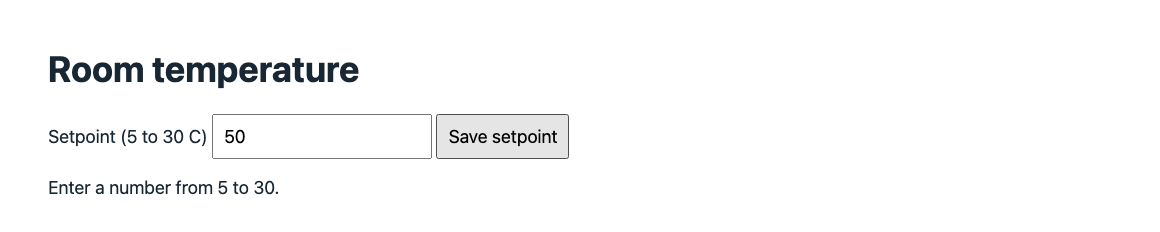
50, and select Save setpoint. The field shows Enter a number from 5 to 30. and no reading is written. - Enter
22and save again. The form shows Saved: 22 C and the device receivessetpoint = 22. - Use the curl command to inspect the
422JSON directly. Admin's Try it uses a profile token, so this Run-user-only script deliberately returns403there.