Using Analysis Endpoints
An Endpoint lets a Luau Analysis answer HTTP requests at {API URL}/endpoint/{analysis id} and every path below it. The caller waits for the script and receives its response: JSON, an HTML page, text, or a redirect. Endpoints are synchronous and available only for Luau, not Bun, Deno, Node.js, Python, or External Analyses.
Turn on an Endpoint
- Create or open a Luau Analysis and save its code in the Analysis tab.
- Open the Endpoint tab. Endpoints are off by default.
- Choose Public or Token, then turn on Enable Endpoint.
- Copy the URL with the copy button beside it. Add
/ordersto it to call the/orderspath in your script.
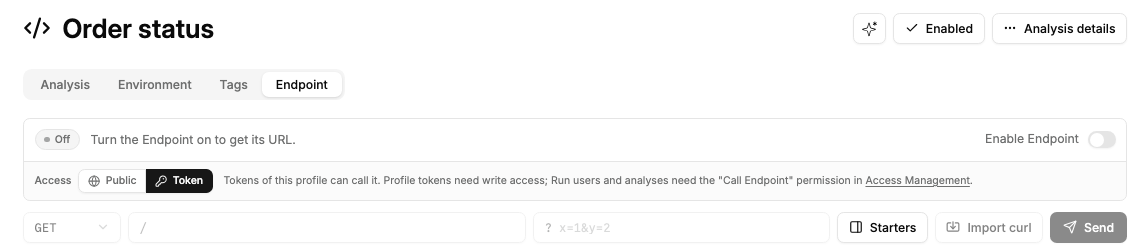
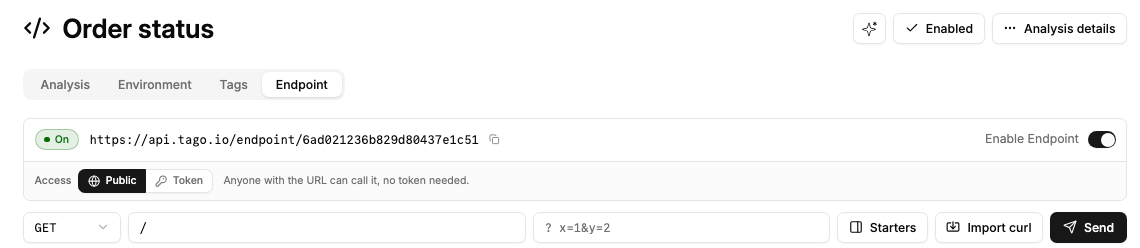
The screenshots show an example API address. Copy your own URL from Admin. A browser opening the URL itself is redirected to the same address with a trailing /, so relative links in your pages stay inside the Endpoint.
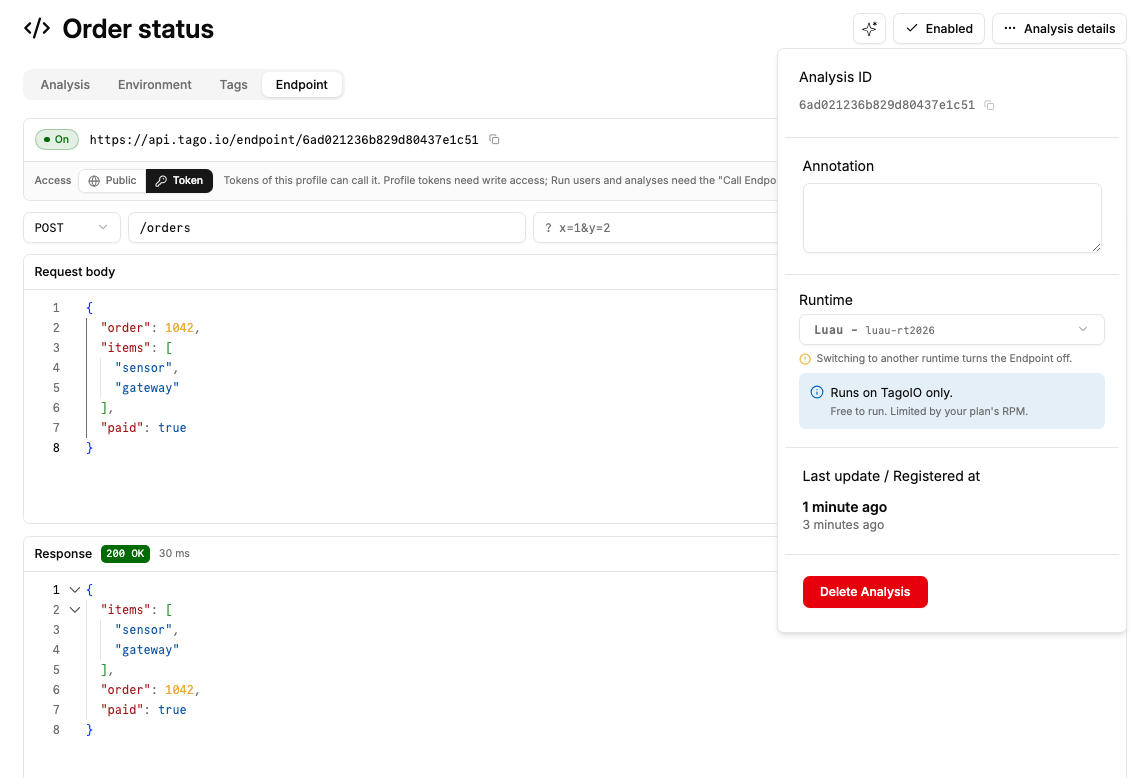
Switching the Analysis to another runtime turns the Endpoint off.
Choose who can call
| Mode | Access |
|---|---|
| Public | Anyone with the URL can run the code without a token, using the Analysis's permissions. Use context.request.caller to restrict what it returns or changes. |
| Token (default) | Requires a token from the Analysis's profile: a profile token with write permission, a device, network, authorization, Run user, or analysis token. |
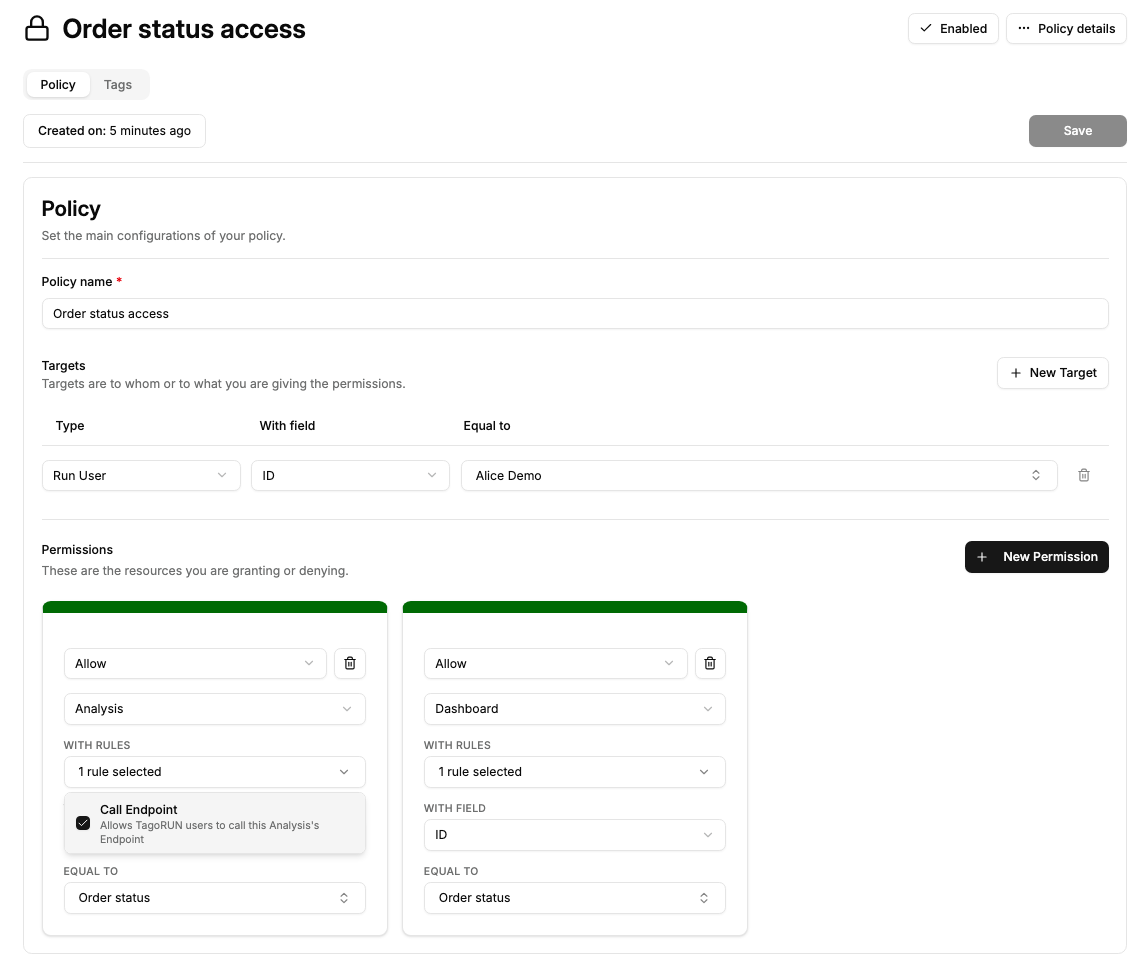
In both modes, a Run user or analysis token also needs Call Endpoint on this Analysis in Access Management. Create a policy targeting those Run users or analyses, add an Allow permission for Analysis, match the intended Analysis, and select Call Endpoint. This is separate from Run Analysis.
Send credentials in a header, never in the URL. Use the token itself as the header value:
| Caller | Header |
|---|---|
| Run user | token |
| Profile | token |
| Device | device-token |
| Network | token |
| Authorization | authorization |
| Analysis | analysis-token |
A supplied token is checked even on a Public Endpoint: an invalid token gets 401; a token from another profile or a caller without a grant gets 404.
The code runs with the Analysis's permissions. Call Endpoint does not grant the caller direct access to devices or entities. Use context.request.caller to restrict what your code returns or changes for each caller. Public access needs no Access Management policy for the caller, but the Analysis still needs permission for any resources its code uses.
Write the response
Use the same Analysis.use callback as other Analysis triggers. This complete example returns the request details and decoded body:
Analysis.use(function(context, scope)
  if not context.request then
    return
  end

  return {
    json = {
      method = context.request.method,
      path = context.request.path,
      query = context.request.query,
      body = scope,
    },
  }
end)
The guard keeps a manual run or another non-Endpoint trigger from reading a missing request.
Request fields
context.request field | Value |
|---|---|
method | Uppercase HTTP method, such as POST. |
path | Path relative to the Endpoint root, starting with /, such as /orders. |
query | Decoded query parameters. Values are strings; a repeated key is an array of strings. |
headers | Request headers with lowercase names. Credential headers and cookie are removed. |
body | Raw request body as a string, including when decoding fails. |
base_url | This Endpoint's root URL, without the trailing /. |
caller | { type, id }. Type is anonymous, profile, device, network, authorization, run_user, or analysis. The ID identifies the owning resource, not the token; it is nil for anonymous callers and the profile ID for authorization tokens. |
For a Run user, context.environment._user_id also contains the user's ID. The request tables are read-only, and authentication headers never reach the script.
The callback's scope is the decoded body for application/json or application/x-www-form-urlencoded. Form values are strings; repeated keys become arrays. Other content types leave scope as nil.
JSON follows Json.decode: top-level null becomes nil, object properties containing null are omitted, and invalid JSON or an array containing null leaves the whole scope as nil. The raw context.request.body remains available.
Return values
| Return | Response |
|---|---|
return { json = data } | JSON, with status 200 and application/json. |
return "<h1>Order received</h1>" | HTML, with status 200 and text/html; charset=utf-8. |
return "Received", { content_type = "text/plain" } | A string with the content type you choose. |
return { json = data, status = 201, headers = { ["x-order-id"] = "1042" } } | JSON with a status and custom response headers. Header values must be strings. |
return { redirect_to = "/thanks" } | A 302 redirect to base_url .. "/thanks". Set status to choose another redirect status. |
return | 204, with no body. |
For a string body, pass status, headers, and content_type in the second return value, for example return html, { status = 404 }.
The supported options are json, status, headers, content_type, and redirect_to. An unknown option or a status that is not an integer between 100 and 599 fails the call. Do not combine json with a string body, or a redirect with either body type.
Test with Try it
In the Endpoint tab, turn on the Endpoint, then:
- Choose a method and enter a path relative to the Endpoint, such as
/orders. Add query parameters in the query field if needed. - For
POST,PUT,PATCH, orDELETE, choose JSON, Form, or Text and enter the body. Try{"order":1042,"items":["sensor","gateway"],"paid":true}as JSON. The example above returns this body insidebody, alongsidemethod,path, andquery. - Select Send. The response panel shows the HTTP status, elapsed time, body, and headers.
Use Import curl to fill the method, path, query, and body from a curl command for this Endpoint. Select Beautify to format a valid JSON request body.
Try it uses your Admin session token, including in Public mode. To test anonymous access, use the Public Endpoint's URL without a token outside Admin.
return { json = scope } echoes the entire decoded request body. For this request, the response contains order, items, and paid.
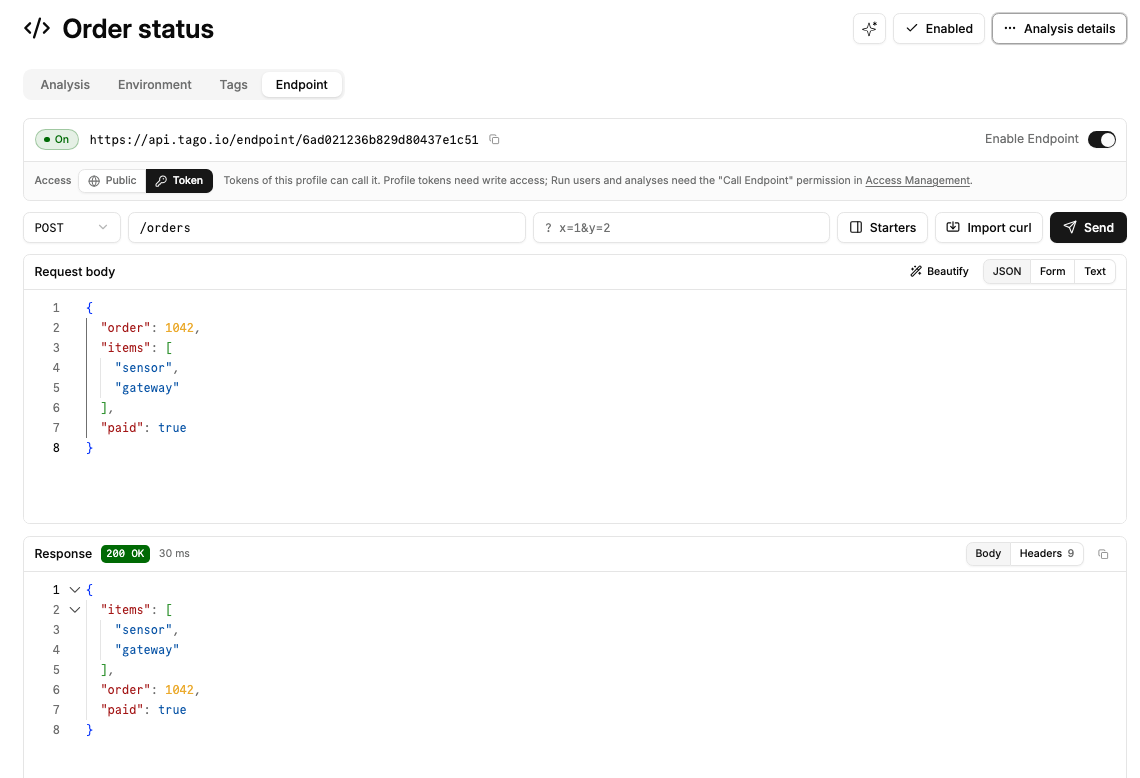
JSON responses are formatted in the editor; HTML and other bodies appear as text, not rendered pages. Redirects are not followed.
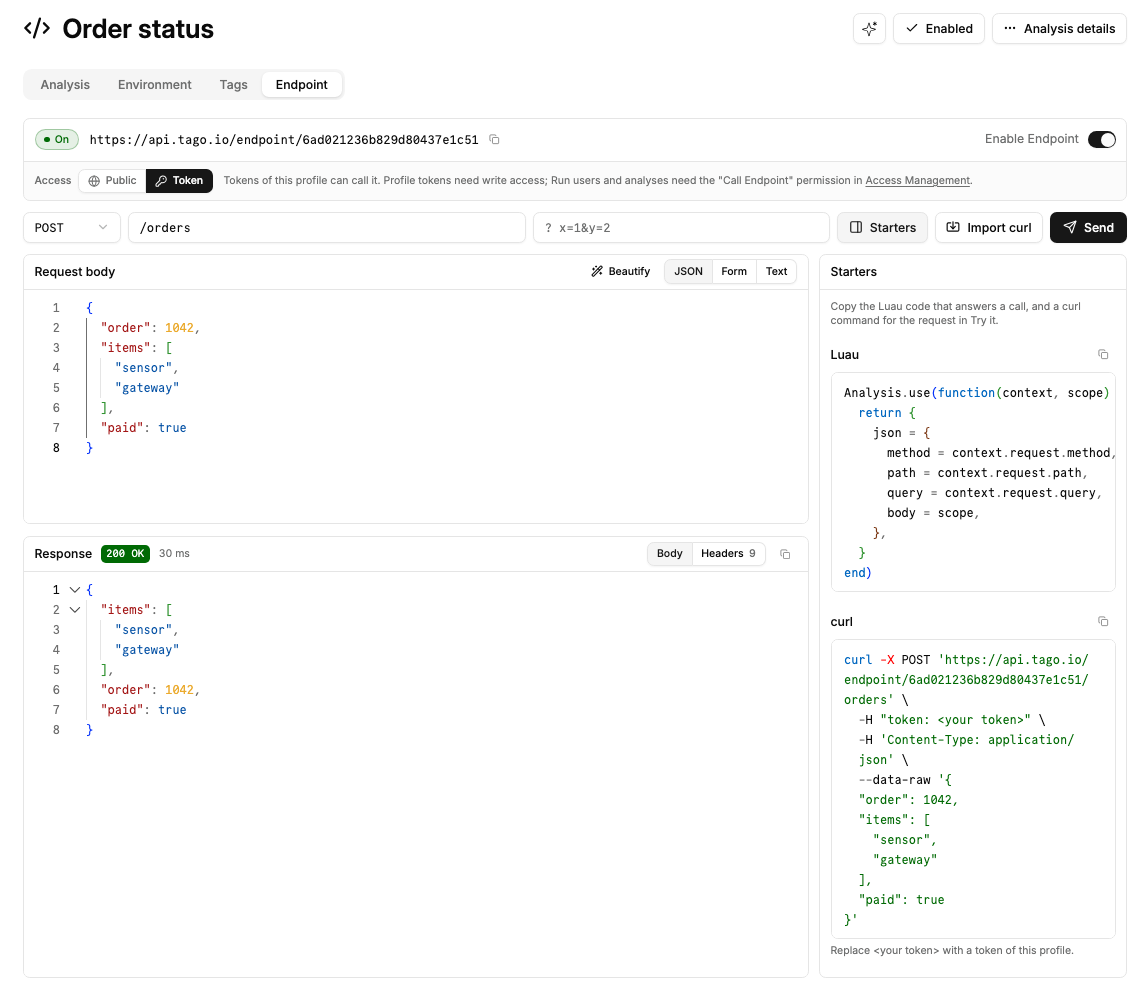
Open Starters for copyable Luau and a curl command matching your request. In Token mode, replace <your token> in the command with a permitted token. The starter never includes your actual token.
The Luau starter returns method, path, query, and body. To return just the decoded body instead, use return { json = scope }.
Call from a Custom Dashboard
A Custom Dashboard in Admin or TagoRUN uses endpoint.list and endpoint.call over the existing postMessage bridge. The host sends the viewer's session token; do not put a token in your HTML.
In TagoRUN, grant the Run user Dashboard > Access on the dashboard and Analysis > Call Endpoint on the Endpoint's Analysis. Public mode does not bypass that grant when the bridge sends the user's token.
For Custom Dashboard callers, every HTTP response, including 4xx and 5xx, returns { status, headers, body }. Check result.status and use result.body to show your script's field errors. A failed request, such as a refused redirect or network failure, becomes a bridge error. See the bridge error table.
See the SQL and Endpoint Bridge for payloads, results, and an example.
Limits and errors
| Limit | Value |
|---|---|
| Request body | 256 KiB |
| Response body | 1 MiB |
| Script execution | 30 seconds |
| Calls per minute, per profile | Free: 60; Starter: 1,000; Scale: 2,000 |
Endpoint bodies use the 256 KiB request and 1 MiB response caps above, not the Luau runtime's 64 KiB per-call data limit.
The Endpoint call allowance is separate from other Luau runs. Other Luau runtime limits and the limits of any resource operations still apply. Use Analysis.run to start longer work in another Analysis and return without waiting for it.
| HTTP status | Meaning |
|---|---|
401 | Missing token in Token mode, or an invalid or unacceptable token in either mode. |
404 | Endpoint not found, off, not Luau, deactivated, on another profile, or not granted to the caller. |
413 | Request body exceeds 256 KiB. |
429 | Call rate limit reached. Wait for the interval in Retry-After. |
500 | Code error, invalid response options or headers, or a response over 1 MiB. Check the Analysis console. |
504 | Execution timed out. |
Failure details go to the Analysis console, not the caller. Your script can also return its own HTTP error status.
Pages and response headers
Endpoint pages render in a browser sandbox. Scripts, forms, and popups can run, but cookies, browser storage, and service workers are unavailable. This applies to HTML, SVG, and XHTML. TagoIO controls CORS and answers OPTIONS preflight requests without running the Analysis.
Your code cannot set these response headers (names are case-insensitive):
set-cookie,clear-site-data,service-worker-allowed,content-security-policynel,report-to,reporting-endpoints,strict-transport-security,alt-svc- Any
access-control-*header content-length,connection,keep-alive,proxy-authenticate,proxy-authorization,proxy-connection,te,trailer,transfer-encoding,upgrade
Setting one fails the call with 500 and names the header in the console. TagoIO also sets X-Content-Type-Options: nosniff on every Endpoint response.