Let a device fetch its configuration
What you'll build
An HTTP device checks in with GET /config using its device token and receives 200 with its sampling settings. The Analysis reads only that caller's configuration parameters. This suits devices that can make HTTP requests but do not receive downlinks.
curl "$ENDPOINT_URL/config" -H "device-token: $DEVICE_TOKEN"
{"sample_interval":"60","reporting":"temperature"}
Set up
Create a Luau Analysis and enable its Endpoint in Token mode. $ENDPOINT_URL is the copied URL without a trailing slash, and $DEVICE_TOKEN belongs to the calling device.
| Item | Value |
|---|---|
| Device configuration parameter | sample_interval = 60 |
| Device configuration parameter | reporting = temperature |
| Analysis variables | None |
| Device firmware | Sends its device token in the device-token header |
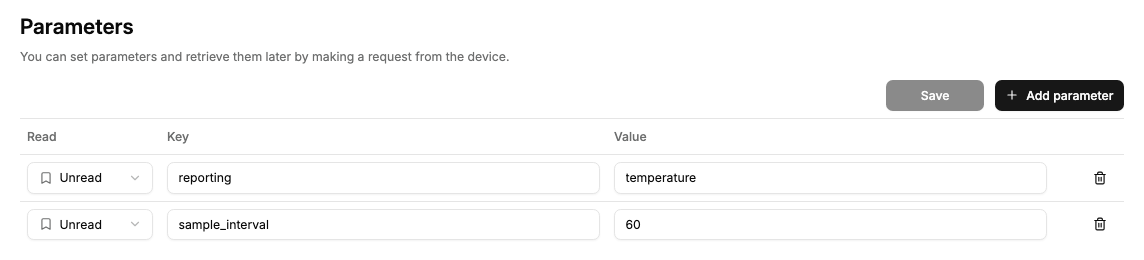
Configuration parameter values are strings, so the device should parse sample_interval as a number if it needs one.
Write the Luau
Paste these blocks in order into the same Analysis; they form one script.
Accept only a device caller on the configuration path.
Analysis.use(function(context, scope)
  local request = context.request
  if not request then return end
  if request.caller.type ~= "device" then
    return { json = { error = "Use a device token." }, status = 403 }
  end
  if request.method ~= "GET" or request.path ~= "/config" then
    return { json = { error = "Not found." }, status = 404 }
  end
Read params() from caller.id and return only the settings the firmware needs.
  local device = Devices.get(request.caller.id)
  local config = {}
  for _, parameter in device:params() do
    if parameter.key == "sample_interval" or parameter.key == "reporting" then
      config[parameter.key] = parameter.value
    end
  end
  return { json = config }
end)
The request cannot choose another device ID. Missing parameters are omitted. Reading with device:params() leaves each parameter's sent flag unchanged, so this Endpoint does not acknowledge delivery.
To mark an existing parameter as delivered, call device:setParams with its id and sent = true after the device acknowledges receipt. This write also requires Device > Edit permission for the Analysis.
Permissions
Grant the Analysis access to only the devices that use this configuration service.
| Target | Resource | Actions |
|---|---|---|
| This Analysis | Calling devices | Access |
| Device caller | Its own device token on the same profile | No Call Endpoint policy required |
Use an Allow permission in Access Management. The Access action permits reading configuration parameters; Get data is not required here.
Try it
- Run the curl command with the device's token. Expect the JSON above with
200. - Change that device's
sample_intervalparameter to120and call again. The response contains"sample_interval":"120". - Call without a token to get
401. A profile token gets the script's403, including in Admin's Try it, which uses your Admin session rather than the device token.