Receive a webhook
What you'll build
A webhook receiver for a weather station integration. Another system sends POST /readings with temperature and humidity, and receives 200 with {"ok":true} after one batched write. The sender puts a TagoIO authorization token in a header; TagoIO checks it before the Luau runs.
curl "$ENDPOINT_URL/readings" -H "authorization: $AUTHORIZATION_TOKEN" -H 'Content-Type: application/json' -d '{"serial":"station-01","temperature":23.5,"humidity":64}'
{"ok":true}
Set up
Create a Luau Analysis and enable its Endpoint in Token mode. Create an Authorization on the same profile and configure the sending system to put that token in its authorization header. $ENDPOINT_URL is the copied Endpoint URL without a trailing slash; $AUTHORIZATION_TOKEN is the sender's token.
| Item | Value |
|---|---|
| Integration device tag | integration = weather-hook |
| Station device tag | serial = station-01; unique within this integration |
| Stored variables | temperature in C, humidity in % |
| Analysis variables | None |
Authorization callers identify the profile, not an individual authorization token. This example allows authorization tokens from that profile and narrows all writes to the fixed weather-hook integration. Do not use it to distinguish two senders that share the profile.
Write the Luau
Paste these blocks in order into the same Analysis; they form one script.
Accept only authorization callers posting to the webhook path.
Analysis.use(function(context, scope)
  local request = context.request
  if not request then return end
  if request.caller.type ~= "authorization" then
    return { json = { error = "Forbidden." }, status = 403 }
  end
  if request.method ~= "POST" or request.path ~= "/readings" then
    return { json = { error = "Not found." }, status = 404 }
  end
  if type(scope) ~= "table" then
    return { json = { error = "Expected a JSON object." }, status = 422 }
  end
Validate every field before selecting a device or writing anything.
  local errors = {}
  if type(scope.serial) ~= "string" or #scope.serial == 0 or #scope.serial > 64 then
    errors.serial = "Use a serial with 1 to 64 characters."
  end
  if type(scope.temperature) ~= "number" or not (scope.temperature >= -50 and scope.temperature <= 100) then
    errors.temperature = "Use a number from -50 to 100."
  end
  if type(scope.humidity) ~= "number" or not (scope.humidity >= 0 and scope.humidity <= 100) then
    errors.humidity = "Use a number from 0 to 100."
  end
  if next(errors) then
    return { json = { errors = errors }, status = 422 }
  end
Match the serial only inside this integration's devices.
  local devices = Devices.list({
    filter = { tags = {
      { key = "integration", value = "weather-hook" },
      { key = "serial", value = scope.serial },
    } },
    amount = 2,
  })
  if #devices ~= 1 then
    return { json = { error = "Station not found." }, status = 404 }
  end
Write both readings in one call and answer without starting other work.
  devices[1]:addData({
    { variable = "temperature", value = scope.temperature, unit = "C" },
    { variable = "humidity", value = scope.humidity, unit = "%" },
  })
  return { json = { ok = true } }
end)
Senders can retry after a timeout. This example records each delivery, so repeated deliveries can create repeated readings; it does not promise exactly-once processing.
A Public Endpoint can compare a custom x-webhook-secret header with an Analysis variable instead of requiring an authorization caller. Fail closed unless both values are non-empty strings and equal; never log them. This is a shared-secret comparison, not a signature check. Luau has no HMAC and cannot verify signed webhooks such as Stripe or GitHub; do not use this variant as a substitute for their signature verification.
Permissions
Use Access Management to grant the Analysis only this integration's devices.
| Target | Resource | Actions |
|---|---|---|
| This Analysis | Device with tag integration = weather-hook | Access, Send data |
| Sending system | Authorization token on the same profile | No Call Endpoint policy is required for this token type |
Try it
- Send the curl request. Expect
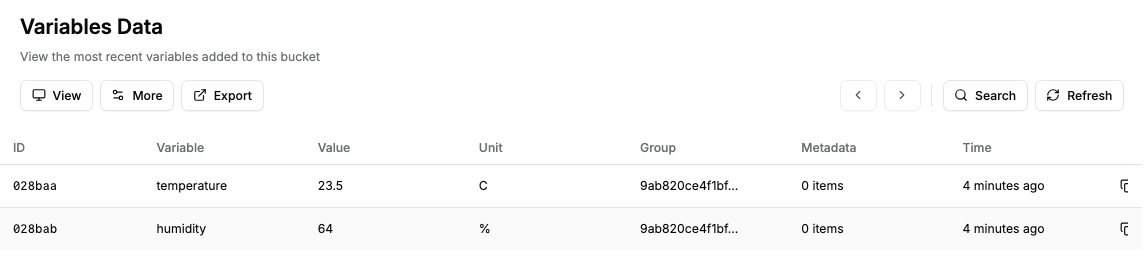
200and{"ok":true}. - Open the station's device data. It has a
temperaturereading of23.5 Cand ahumidityreading of64 %. - Send
humidity: 150. Expect422and{"errors":{"humidity":"Use a number from 0 to 100."}}; neither reading is written.
Admin's Try it sends a profile token, so this authorization-only example returns 403 there. Test with the sender's header or the curl command instead.