Defining Permissions
You need to set up Permissions to define which types of resources your Targets will be allowed or denied access to.
The resources available to grant permission depend on the Target you select, and the rules available depend on the resource selected. For more information, see Defining Targets.
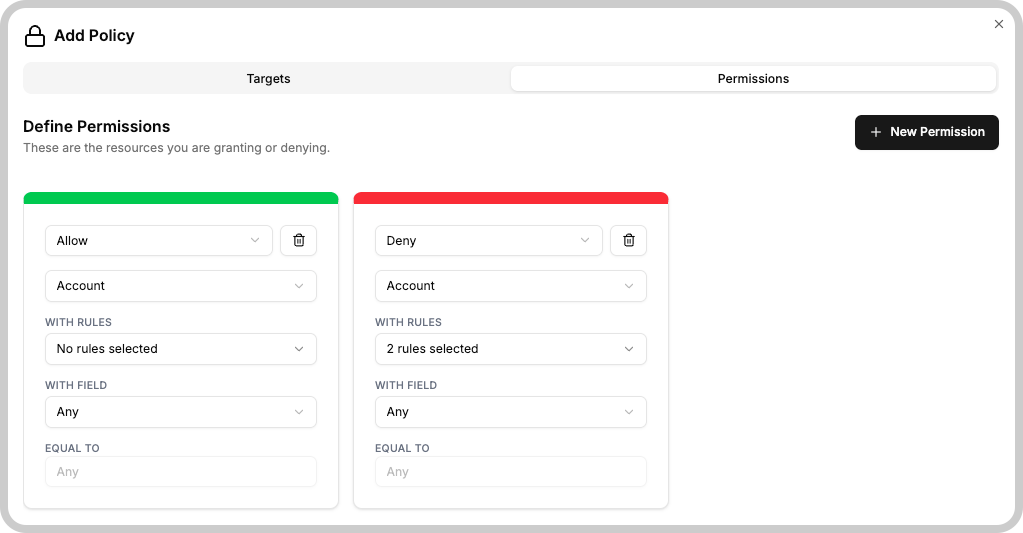
Adding resources and how rules are applied
You can add as many resources as needed. An OR operation is applied between permissions: as you add more permissions, more resources will be included in the verification process.
Denial permissions will override any permissions granting access to the same resource.
AI
The AI resource controls the AI Chat in TagoRUN for Run user Targets. It has no individual resources to match, so its permission always applies to the whole feature. Its rules are:
| Rule | What it grants |
|---|---|
| Access | The user sees and can use the AI chat. Required for every other rule. |
| Read device data | The assistant can list devices and read their data on the user's behalf. |
| Read entity data | The assistant can read entity schemas and data on the user's behalf. |
| Read dashboards | The assistant can list dashboards on the user's behalf. |
| Read users | The assistant can list TagoRUN users on the user's behalf. |
The read rules say what kind of resource the assistant may read. Which resources it may read is decided by the AI access rule on the resource permission itself.
AI access on resources
Device, Entity, Dashboard, Run User, and SQL Query permissions for Run user Targets have an AI access rule next to their existing rules. It marks the matched resources as readable by the assistant for the targeted users, and matches by ID, tag, or Any like any other rule.
AI access is separate from the rules the portal uses. Dashboard access on a device lets the user see it in dashboards and says nothing about the assistant. Grant both when the user should have both.
A complete grant to read device data therefore needs two permissions: AI with Access and Read device data, and Device with AI access on the devices in question. A grant missing either half reads nothing.
AI and Custom Dashboards
Run users can view AI Dashboards and Custom Dashboards in TagoRUN. Both need Dashboard with Access. Their data needs a different second permission:
| Dashboard type | Data permission | What limits the data |
|---|---|---|
| AI Dashboard | Device with Dashboard access, and Entity with Blueprint access for entity data | Queries return rows only from the devices and entities the user can access. Live refresh signals follow the stream rule in the live streams row below. See What each Run user sees for what happens when a rule is removed. |
| Custom Dashboard using SQL | SQL Query with Access and Execute | The query itself, through Session Context. |
| Custom Dashboard using Endpoints | Analysis with Call Endpoint | The Analysis's code, using the caller's identity to limit returned data and changes. |
| Custom Dashboard using live streams | A Run user's stream on a device or entity is allowed by Dashboard access (Blueprint access for an entity) on it, or by a widget on a Normal or Blueprint dashboard the Run user has Access to that shows it. The AI or Custom Dashboard being viewed never counts, because its layout is not made of widgets the server checks. | The stream rule in the Data permission cell. The grant follows the device, not the variable a widget shows: a device shown by a widget on an accessible Normal or Blueprint dashboard streams every variable the embed subscribes, values included, also variables no widget shows. The watch list from sql.run names only devices and entities the user has Dashboard access or Blueprint access to. |
Titles and text on an AI Dashboard are visible to every user with Access to it, whatever their device permissions. See AI Dashboard in TagoRUN, Custom Dashboard in TagoRUN, and Live data in TagoRUN.
SQL Queries
The SQL Query resource grants actions on TagoSQL stored queries. Run user Targets can be granted Access (list and view queries), Execute (run them), and AI access (let the AI chat discover and run them on the user's behalf); analysis Targets can additionally be granted Create, Edit, and Delete.
Granting execution of a query grants its full result set. The policy decides which queries a caller may run, never which rows or columns come back.
To scope what each Run user sees within a single query, see Session Context. The same scoping applies when the AI chat runs the query; see Restrict AI results with a saved TagoSQL query.
Analysis Endpoints
Call Endpoint on an Analysis lets a Run user or analysis Target call its Endpoint. In With field, match the Analysis by ID, Tag, Tag Match, or Any. The permission applies in both Public and Token modes when a Run user or analysis token is sent. It is separate from Run Analysis.
A Public Endpoint also accepts requests without a token and needs no caller policy for those requests. The Analysis's own resource permissions still control what its code can do.