SQL and Endpoint Bridge
Experimental. This feature may change or be removed.
Your Custom Dashboard HTML talks to TagoIO only through window.postMessage with its parent (Admin or TagoRUN). Use
that channel to list and run saved TagoSQL queries or call
Analysis Endpoints.
There is no free-form SQL from the embed, and the host does not send results until your page requests them.
The shell supplies params values itself. The host does not inject dashboard or user identity (no
host-context binding); use TagoSQL session functions for identity inside SQL where supported.
The host fulfills each request with the viewer's own session against existing APIs: your session in Admin, the Run user's session in TagoRUN. The same page works in both. Public share and distribute are not supported.
Host messages for ready, theme, and style stay on the shell side. See Authoring HTML for
dashboard:ready, dashboard:theme, and dashboard:style, and Live Data
for the stream operations and dashboard:event. This page covers the data request/response bridge.
Envelope
Embed to host (request)
{
  "type": "dashboard:request",
  "id": "unique-string",
  "op": "sql.list",
  "payload": {}
}
| Field | Required | Meaning |
|---|---|---|
type | Yes | Always "dashboard:request". |
id | Yes | Any unique string your page picks. The host echoes it on the response. |
op | Yes | Operation name (see below). |
payload | Depends | Op-specific body. Use {} or omit when the op takes no fields. |
A malformed request without id is silently dropped. When id is present but the request is otherwise
malformed, the host responds with bad_request.
Host to embed (response)
{
  "type": "dashboard:response",
  "id": "unique-string",
  "ok": true,
  "result": {}
}
On failure:
{
  "type": "dashboard:response",
  "id": "unique-string",
  "ok": false,
  "error": { "code": "not_found", "message": "..." }
}
| Field | Meaning |
|---|---|
type | Always "dashboard:response". |
id | Same string as the request. |
ok | true with result, or false with error. |
result | Present when ok is true. Shape depends on op. |
error | Present when ok is false. Includes code and a human-readable message. |
Match responses to in-flight calls by id. Ignore responses whose id you did not send.
Operations
| Op | Payload | Result on success |
|---|---|---|
sql.list | None / {} | { queries: [{ id, name }] } |
sql.run | { query_id, params?, after_device?, test?, watch? } | { columns: string[], rows: object[], meta: { row_count, execution_ms, served_from_cache }, watch? } |
endpoint.list | None / {} | { endpoints: [{ id, name }] } |
endpoint.call | { endpoint_id, method?, path?, query?, body? } | { status, headers, body } |
stream.open | { devices?, entities? } | { stream_id }. See stream.open. |
stream.close | { stream_id } | {}. See stream.close. |
SQL operations use only saved queries. The embed cannot send a SQL string to run. The stream operations open and
close live data streams; the host then pushes dashboard:event messages. They are documented on
Live Data.
sql.list
Lists saved TagoSQL queries on the profile.
const { queries } = await request("sql.list");
// queries: [{ id: "...", name: "..." }, ...]
sql.run
Runs one saved query by id. Optional params override the query's saved default parameters for this run.
const result = await request("sql.run", {
  query_id: "...",
  params: [{ key: "$1", value: "30" }],
});
// result: {
//   columns: string[],
//   rows: object[],  // each row is an object keyed by column name
//   meta: { row_count, execution_ms, served_from_cache }
// }
| Field | Required | Meaning |
|---|---|---|
query_id | Yes | Id of a saved query from sql.list (or known from your profile). |
params | No | Array of { key, value } pairs. Keys match placeholders such as $1. |
after_device | No | Device ID cursor for the next page of a multi-device query. |
test | No | true bypasses the query cache. |
watch | No | true adds watch, the devices and entities the query read, to the result. See sql.run with watch. |
When you omit params, the query runs with its stored defaults. See
TagoSQL parameters for parameter shapes and
Executing queries for pagination and cache behavior.
On success, the bridge returns a normalized result:
| Field | Meaning |
|---|---|
columns | Column names as strings, in order. |
rows | Array of row objects; each row is keyed by column name. |
meta | { row_count, execution_ms, served_from_cache } for this run. |
watch | Only when the request set watch: true: { devices: [{ id, variables? }], entities: [{ id }] }, what the query read. In TagoRUN it names only the devices and entities the Run user can access. Pass it to stream.open. |
This shape differs from calling POST /sql/{id}/execute directly. Raw execute returns typed
{ name, type } columns and flat metadata; the bridge normalizes columns to name strings and nests meta.
endpoint.list
Lists active Luau Endpoints the viewer may call. In TagoRUN, the list contains only Analyses granted to the Run user through Call Endpoint, even when an Endpoint is Public. The result includes IDs and names, not URLs or tokens.
endpoint.call
Calls an Endpoint with the viewer's session token. Using the request helper in the example below:
const { endpoints } = await request("endpoint.list");
const endpoint = endpoints.find((item) => item.name === "Order status");
if (endpoint) {
  const result = await request("endpoint.call", {
    endpoint_id: endpoint.id,
    method: "POST",
    path: "/orders",
    body: { order: 1042 },
  });
  console.log(result.status, result.body);
}
| Field | Required | Meaning |
|---|---|---|
endpoint_id | Yes | Analysis ID from endpoint.list, or a known ID on the profile. |
method | No | GET (default), POST, PUT, PATCH, or DELETE. |
path | No | Path relative to the Endpoint root; defaults to /. A leading / is optional. . and .. segments are rejected. |
query | No | Object with string, number, or boolean values, or arrays of those values for repeated keys. Values are sent as strings. |
body | No | Strings use the browser's Content-Type: text/plain;charset=UTF-8; other values are encoded as JSON with Content-Type: application/json. Not allowed with GET. |
For a string body, the bridge sets no explicit Content-Type; the browser supplies the value above. In the Analysis, scope is nil and context.request.body holds the string.
The bridge accepts no custom request headers or token. Every HTTP response resolves with status,
headers, and body, including 4xx and 5xx. headers contains the response headers available to the
browser, and body is parsed JSON when the content type is JSON; otherwise it is text. Invalid JSON remains text.
Check result.status before treating a response as success. For example, 422 can return field errors in
result.body.errors, and 404 remains a result with status: 404. A refused redirect, network failure,
or invalid request payload or path is a bridge error instead. See the
form validation recipe.
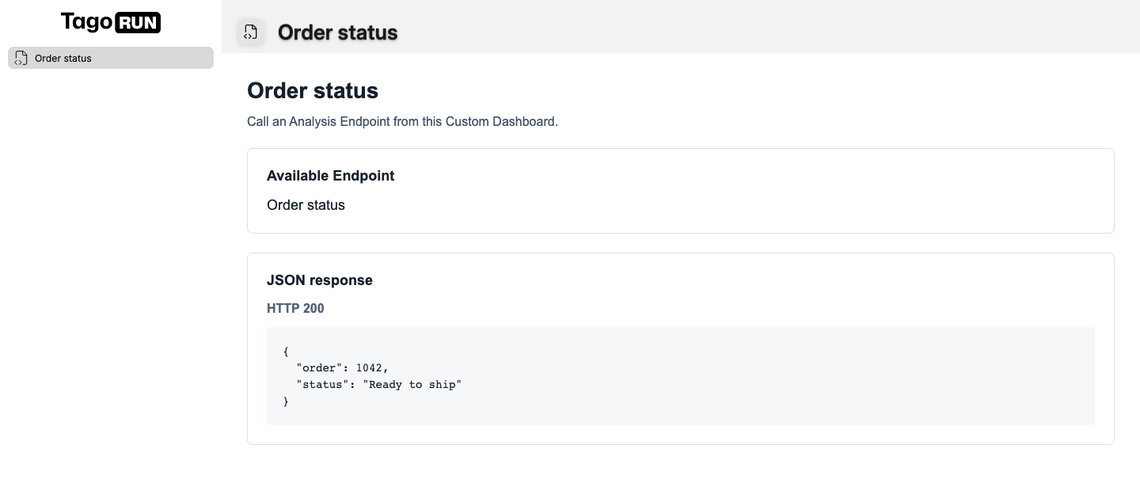
The Order status Analysis returns the submitted order number and "Ready to ship" with return { json = { order = scope.order, status = "Ready to ship" } } in its Analysis.use callback.
In TagoRUN
In TagoRUN, the bridge runs every call with the signed-in Run user's session. The Run user's Access Management policies decide what the page can do:
sql.listreturns only the queries the Run user has SQL Query Access to.sql.runruns a query only when the Run user has SQL Query Execute on it. Otherwise the response isforbidden.endpoint.listandendpoint.callrequire Analysis > Call Endpoint on the Endpoint's Analysis. Without it, the Endpoint is absent from the list and a call returns a result withstatus: 404.
The policy decides which queries the page can run, never which rows come back. Device permissions do not
filter Custom Dashboard queries, but they gate streams: sql.run with watch lists only the devices the Run
user has Dashboard access to and the entities they have Blueprint access to, and stream.open streams a
resource only under that rule or through a widget on a Normal or Blueprint dashboard the Run user has
Access to that shows it. See In TagoRUN on the Live Data page. When one
dashboard serves several customers, write each query so it reads the Run user's own scope, for example with
session_user_tag('customer'). See Session Context.
An Endpoint runs with the Analysis's permissions, not the viewer's device permissions. Limit each user's
results and allowed changes in the Luau code using context.request.caller or context.environment._user_id.
See Endpoint access.
Errors
endpoint.call returns HTTP error statuses in its result, not in this table. These HTTP-to-error mappings
apply to the other operations, including endpoint.list; request and transport errors still apply to endpoint.call.
| Code | Meaning |
|---|---|
not_found | HTTP 404 from a listing or SQL operation: resource not found or not granted. |
forbidden | HTTP 403: permission denied, such as a query without Execute. |
plan_limit | HTTP 402: plan limit reached. |
timeout | HTTP 408 from a listing or SQL operation. |
rate_limited | HTTP 429: request rate limit reached. |
bad_params | Other HTTP 4xx responses, including 401 and 413. |
api_error | Server failure in a listing or SQL operation; network failure or a refused redirect. |
unknown_op | Unsupported operation name. |
bad_request | Malformed envelope or payload, or a request the host refuses, such as a sixth open stream or a stream.open list with no device and no entity; rejected before an API call. |
Treat error.message as human-readable detail; branch on error.code in code.
Example
Core request/response helper and a first-query run:
<script>
  const pending = new Map();
  window.addEventListener("message", (event) => {
    const msg = event.data;
    if (msg?.type !== "dashboard:response" || !pending.has(msg.id)) return;
    const { resolve, reject } = pending.get(msg.id);
    pending.delete(msg.id);
    msg.ok ? resolve(msg.result) : reject(new Error(`${msg.error.code}: ${msg.error.message}`));
  });

  function request(op, payload) {
    const id = crypto.randomUUID();
    return new Promise((resolve, reject) => {
      pending.set(id, { resolve, reject });
      window.parent.postMessage({ type: "dashboard:request", id, op, payload }, "*");
    });
  }

  async function main() {
    const { queries } = await request("sql.list");
    if (!queries.length) return;
    const result = await request("sql.run", { query_id: queries[0].id });
    console.log(result);
  }
  main();
</script>
Full page that also signals ready, applies theme, and renders rows into a table. The request/pending pattern matches the script above:
<!DOCTYPE html>
<html lang="en">
  <head>
    <meta charset="utf-8" />
    <title>Custom Dashboard</title>
    <style>
      :root {
        color-scheme: light dark;
      }
      body {
        font-family: system-ui, sans-serif;
        margin: 1.5rem;
      }
      table {
        border-collapse: collapse;
        width: 100%;
      }
      th,
      td {
        border: 1px solid #ccc;
        padding: 0.4rem 0.6rem;
        text-align: left;
      }
      #status {
        color: #666;
      }
    </style>
  </head>
  <body>
    <h1>Custom Dashboard bridge example</h1>
    <p id="status">Loading...</p>
    <div id="table"></div>
    <script>
      const statusEl = document.getElementById("status");
      const tableEl = document.getElementById("table");
      const pending = new Map();

      window.addEventListener("message", (event) => {
        // Accept messages only from the host window. Allowlisting the Admin and TagoRUN origins is stricter.
        if (event.source !== window.parent) return;
        const msg = event.data;
        if (!msg || typeof msg !== "object") return;

        if (msg.type === "dashboard:theme") {
          document.documentElement.dataset.theme = msg.theme;
          return;
        }

        if (msg.type === "dashboard:style") {
          Object.assign(document.body.style, msg.style ?? {});
          return;
        }

        if (msg.type !== "dashboard:response" || !pending.has(msg.id)) return;
        const { resolve, reject } = pending.get(msg.id);
        pending.delete(msg.id);
        msg.ok ? resolve(msg.result) : reject(new Error(`${msg.error.code}: ${msg.error.message}`));
      });

      function request(op, payload) {
        const id = crypto.randomUUID();
        return new Promise((resolve, reject) => {
          pending.set(id, { resolve, reject });
          window.parent.postMessage({ type: "dashboard:request", id, op, payload }, "*");
        });
      }

      function renderTable(result) {
        const columns = result.columns ?? [];
        const rows = result.rows ?? [];
        tableEl.replaceChildren();
        if (!columns.length && !rows.length) {
          tableEl.textContent = JSON.stringify(result, null, 2);
          return;
        }
        const table = document.createElement("table");
        const thead = document.createElement("thead");
        const headerRow = document.createElement("tr");
        for (const key of columns) {
          const th = document.createElement("th");
          th.textContent = key == null ? "" : String(key);
          headerRow.appendChild(th);
        }
        thead.appendChild(headerRow);
        table.appendChild(thead);
        const tbody = document.createElement("tbody");
        for (const row of rows) {
          const tr = document.createElement("tr");
          for (const key of columns) {
            const td = document.createElement("td");
            const value = row[key];
            td.textContent = value == null ? "" : String(value);
            tr.appendChild(td);
          }
          tbody.appendChild(tr);
        }
        table.appendChild(tbody);
        tableEl.appendChild(table);
      }

      async function main() {
        try {
          const { queries } = await request("sql.list");
          if (!queries.length) {
            statusEl.textContent = "No saved queries on this profile.";
            return;
          }
          statusEl.textContent = `Running: ${queries[0].name}`;
          const result = await request("sql.run", { query_id: queries[0].id });
          statusEl.textContent = queries[0].name;
          renderTable(result);
        } catch (err) {
          statusEl.textContent = String(err.message ?? err);
        }
      }

      parent.postMessage({ type: "dashboard:ready" }, "*");
      main();
    </script>
  </body>
</html>
Register the response listener before you call request. Prefer allowlisting the Admin and TagoRUN origins
on inbound messages; see Authoring HTML.
Related
- Authoring HTML (ready, theme, style)
- Live Data (streams and
dashboard:event) - Custom Dashboard
- TagoSQL queries
- Analysis Endpoints
- Executing queries
- HTML shell