Queclink GPS
Queclink GPS can be integrated with TagoIO through middleware that translates the device's TCP/IP protocol. The middleware enables uplink communication between the device and TagoIO while parsing messages to extract commands and variables in real time.
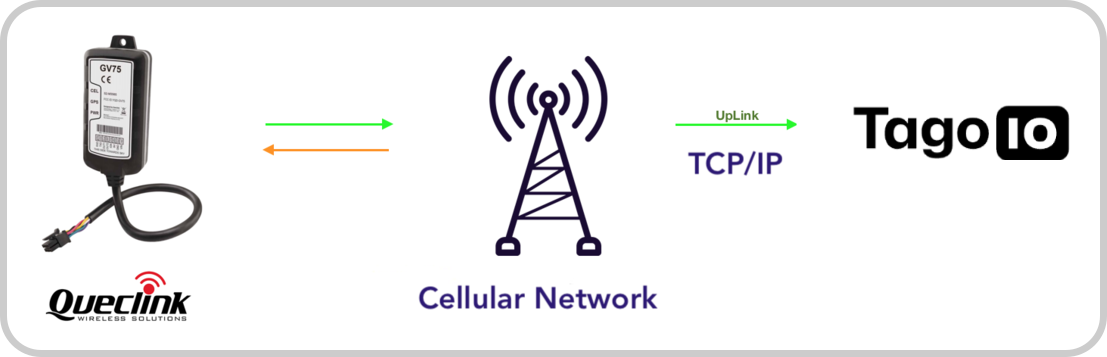
Downlink messages must be accomplished using SMS messages or Queclink tools; they cannot be sent from TagoIO.
Queclink Setup
Configure your GPS so it sends data to the TagoIO middleware. Follow the Queclink manual to set the protocol type, host URL, and port as shown below:
| Parameter | Value |
|---|---|
| Protocol | TCP/IP |
| Host URL | queclink.middleware.tago.io |
| Port | 50005 |
TagoIO Setup
Add a device in your account at TagoIO. Go to Devices and click on 'Add Devices', filter network by 'Cellular' and pick your device from the list.
Devices currently integrated with TagoIO
- GL505
- GV300
- GV300 CAN
- GV75
- GV55* contact us for updates
Once the device is created, you will receive a confirmation. Turn your GPS on and wait for data to be stored on your Device.
Building Dashboards
Create a dashboard by adding gauges, maps (add the variable 'location'), tables, and more.
You can also set up notifications to send push notifications, SMS, or emails: Notifications. Advanced analysis scripts are available here: Scripts.
GPS Configuration
For detailed GPS configuration settings, refer to the Queclink manual: GPS configuration.