Notifications
TagoIO will notify you when something needs your attention. You may need to perform an action depending on the type of notification.
Types of notifications
There are four types of notifications:
-
Applications
Sent by a customized script triggered by an Analysis. Examples: "Two trucks are out of route", "Your refrigerator temperature is higher than 36 °F". -
Other users
Displayed when another user shares something with you. Example: "John wishes to share a Dashboard with you." -
TagoIO system
Used by the TagoIO backend to notify users about the system or your account. Example: "There is a new application in the Healthcare industry that you may be interested in." -
TagoRUN User
Notifications sent to users registered in your account's User Management. Only your account (or authorized users) can send notifications to these users. Learn more in Run Users Notifications.
Viewing notifications
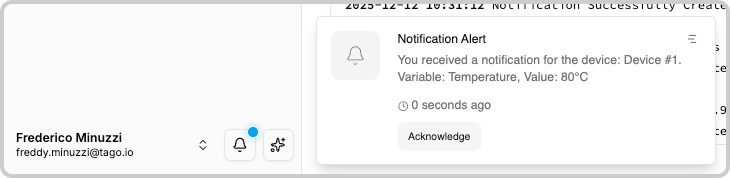
When you log in to your account, you can see all your notifications in the bottom-left corner of the admin page with a blinking blue dot indicating unread notifications.
Filtering and searching
On the Notifications window, you can:
- Filter by read/unread status.
- Filter by the type of notification.
- Use the search field to refine results.
Notifications from Other Users
These notifications are usually related to authorization requests asking you to accept dashboards or profiles. In these cases, you need to first accept the request before the shared item is available to you.
The user who sent the request can track the status of the request by checking the "Share" tab of each item (Dashboard/Profile).
After you accept or decline a notification, the system removes the dark blue unread icon. TagoIO automatically removes all ignored notifications that are older than two weeks.
Notifications from Applications
Application notifications can give you the option to be redirected to a dashboard that can contain more information about the event. The content of the notification and the button that links to the dashboard (which is optional) is defined by the developer.
To learn how to create an Application notification from an Analysis, check our SDK documentation.