Metadata
Metadata is one of the most important concepts when creating dashboards and widgets. Metadata is a piece of information that you can store in the variable payload.
With metadata, it is possible to dynamically change the behavior of the widget and how it displays the variable data. For example, it can change a map pin color or place a heat map bubble in another position, and more.
JSON example
{
  "variable": "current",
  "value": 5.3,
  "unit": "A",
  "metadata": {
    "color": "red",
    "my_application_id": "378392922"
  }
}
Using custom metadata fields
You can define your own metadata fields and use them in your Analysis or Application. Some metadata fields trigger specific widget behaviors or change how the widget displays the data.
Metadata has priority over customizations set in the widget edit screen. Some widgets provide an option to change this behavior.
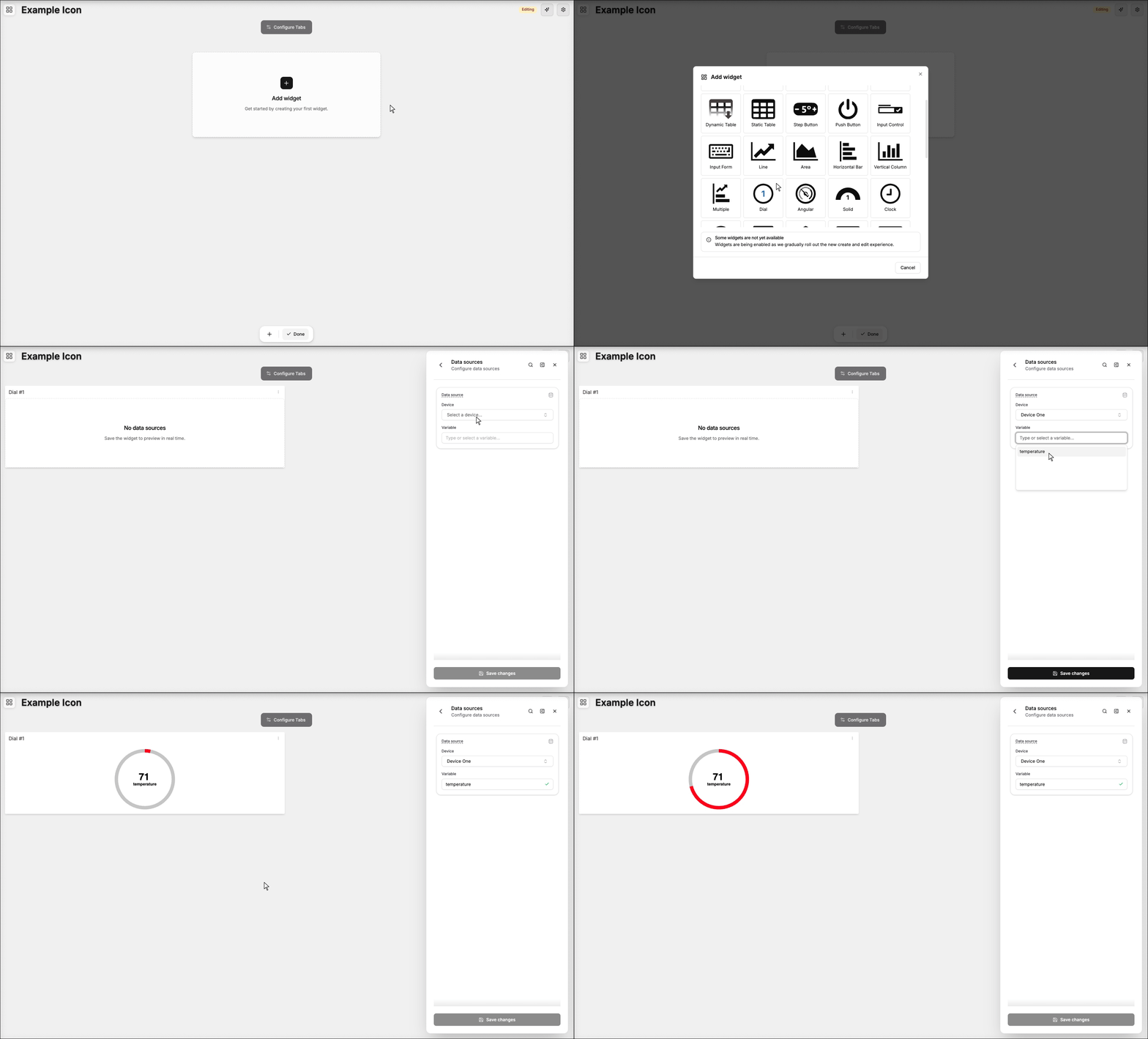
For example, this article uses the color metadata field in the following JSON payload:
{
  "variable": "temperature",
  "value": 71,
  "metadata": {
    "color": "red"
  }
}
Available Metadata Fields
| Field | Description | Widget |
|---|---|---|
| background_color | Changes the widget background color. It accepts CSS color keywords or HSL, RGB, and HEX color codes. | Angular, Card, Dial, Grain Bin, Image, Solid, Vu Meter |
| button_color | Sets a color for the button. It accepts CSS color keywords or HSL, RGB, and HEX color codes. | Push Button, Step Button |
| chart_color | Changes the chart color. It accepts CSS color keywords or HSL, RGB, and HEX color codes. | Card |
| color | Sets a color for this variable data. It accepts CSS color keywords or HSL, RGB, and HEX color codes. | Angular, Area Chart, Card, Cylinder, Dial, Dynamic Table, Grain Bin, Horizontal Bar, Icon, Image Marker, Keypad, Line Chart, Map, Multiple Charts, Pie, Semi Donut, Semi Pie, Solid, Static Table, Step Button, Vertical Column, Vu Meter |
| contributors | Lists the top contributing variables for a scored cell, as an array of { variable, weight } with weight from 0 to 1. | Calendar Heatmap |
| dropdown_option_hidden | Dynamically hides the option from dropdown fields. Accept true or false | Dynamic Table, Static Table, Device List, User List, Input Form |
| embed | Sets an embedded URL for the variable display | Compose, Image Marker |
| end_date | Specifies the end of a date range. It accepts the date and time in the ISO 8601 format. | Area Chart, Horizontal Bar, Line Chart, Multiple Charts, Vertical Column |
| expected_max | Upper bound of the expected range for a scored cell. It only accepts numerical values. | Calendar Heatmap |
| expected_min | Lower bound of the expected range for a scored cell. It only accepts numerical values. | Calendar Heatmap |
| icon | Specifies an icon for the variable data. It accepts the TagoIO icon's name, and an SVG file URL. | Compose, Icon, Image Marker, Map |
| img_pin | Sets an image for the infobox. It only accepts image file URLs. | Image Marker, Map |
| label | Displays a label instead of the variable value | Compose, Dynamic Table, Image Marker, Map, Static Table |
| layer | Sets the specific layer id that this data is related to | Image Marker |
| limit_superior | Specifies the end of a scale range. It only accepts numerical values. | Angular, Dial, Cylinder, Grain Bin, Heat Map, Solid, Vu Meter, Line Chart |
| limit_inferior | Specifies the start of a scale range. It only accepts numerical values. | Angular, Dial, Cylinder, Grain Bin, Heat Map, Solid, Vu Meter, Line Chart |
| lower | Lower confidence bound for a forecast point. It only accepts numerical values (absolute, not an offset). | Line Chart |
| observed | Observed value for a scored cell, shown in the hover card. It only accepts numerical values. | Calendar Heatmap |
| point_color | Sets a color for the chart point (can be replaced by the color field). It accepts CSS color keywords or HSL, RGB, and HEX color codes. | Area Chart, Horizontal Bar, Line Chart, Multiple Charts, Vertical Column |
| radius | Sets a point radius for charts. It only accepts numerical values, and the default value is 4. | Area Chart, Heat Map, Horizontal Bar, Line Chart, Multiple Charts, Vertical Column |
| recolor | Repaints the series inside an anomaly time or value band with the band color. Accepts true or false. | Line Chart |
| severity | Overrides the severity tier for a scored cell. Accepts normal, low, elevated, warning, high, or critical. | Calendar Heatmap |
| start_date | Specifies the start of a date range. It accepts the date and time in the ISO 8601 format. | Area Chart, Horizontal Bar, Line Chart, Multiple Charts, Vertical Column |
| text_color | Sets a color for the widget text. It accepts CSS color keywords or HSL, RGB, and HEX color codes. | Angular, Cylinder, Dial, Grain Bin, Push Button, Solid, Vu Meter |
| upper | Upper confidence bound for a forecast point. It only accepts numerical values (absolute, not an offset). | Line Chart |
| url | Shows an external URL | Compose, Dynamic Table, Image Marker, Map, Static Table |
| url_label | Adds a custom label instead of showing the external URL link | Compose, Image Marker |
| x | Sets the x coordinate. It only accepts numerical values from 0 to 1. | Compose, Image Marker, Heat Map |
| y | Sets the y coordinate. It only accepts numerical values from 0 to 1. | Compose, Image Marker, Heat Map |
Form Field Metadata
Some widgets such as Input Form, Dynamic Table, and others allow users to edit variable data through form fields. The following metadata can be used for custom behavior in these form fields:
| Field | Description | Form field type |
|---|---|---|
| label | Displays a label instead of the variable value | Dropdown, Dropdown Multiple, Filtered Variables |
| end_date | Specifies the end of a date range. It accepts the date and time in the ISO 8601 format. | Calendar |
| start_date | Specifies the start of a date range. It accepts the date and time in the ISO 8601 format. | Calendar |
| type | Changes the box validation color. Accepts: "success", "danger", "error", "danger-light", "error-light", "info", "warning" and "dark". | Validation |