TagoAI Features
TagoAI powers AI features across TagoIO. This page covers each feature, how requests are billed, and how to set the default model each feature runs on.
AI features
| Feature | Where it appears | Who selects the model | Main purpose |
|---|---|---|---|
| Chat | TagoIO Admin | The chat user, within the profile's chat model menu | Ask questions and work with TagoIO resources |
| AI Dashboards | Dashboard creation and editing in the Admin | Profile default | Generate and refine dashboard layouts |
| AI Chat in TagoRUN | TagoRUN portal | Profile default | Read-only assistant for your portal users |
Chat
Chat is the assistant panel in the Admin console, and it is available only there; RUN users use AI Chat in TagoRUN. It answers questions about TagoIO and acts on your resources: inspecting devices, building dashboards, writing Analysis code. You pick a model and reasoning effort per chat, and control what it may change with the Read Only, Edit Mode, and Full Access modes.
AI Dashboards
AI Dashboards generate a dashboard layout from a natural language description and the devices and variables available to the profile.
AI Dashboards use a full-page generated layout rather than the configurable widget grid used by Normal and Blueprint dashboards. The feature is experimental. You generate AI Dashboards in Admin, and signed-in RUN users can view them read-only in TagoRUN. See Access and Limits.
AI Chat in TagoRUN
AI Chat in TagoRUN is the assistant inside the profile's TagoRUN portal, for your RUN users. You turn it on per portal, give it a system prompt about your application, and decide through Access Management which users get it and which devices, entities, dashboards, users, and TagoSQL queries it may read for them. It is read-only. It runs on the model configured for TagoRUN on the profile, or the free model when none is configured, and RUN users cannot change it.
How feature requests are billed
Billing depends on the model used, not on the feature:
- The free model uses the profile's monthly free model allowance. TagoRUN chats draw from a separate allowance of the same size, so portal traffic never consumes the Admin's requests.
- TagoIO catalog models use AI Credits.
- Models from a connected provider are billed by that provider.
All requests appear in the AI usage statistics, identified by feature.
When a request is refused
The reason depends on the selected model:
- Free model: the profile has no free model requests remaining in the pool the request draws from, or is temporarily rate limited. Admin requests draw from the profile allowance; TagoRUN chats draw from the separate TagoRUN AI requests allowance, and a portal user sees the code RA07 when it is exhausted.
- TagoIO catalog model: the account has insufficient AI Credits, or the profile cannot spend more under its monthly spend cap. A portal user sees the code RA05.
- Connected-provider model: the provider rejects the request because of credentials, availability, quotas, or rate limits.
Disabling AI on the profile prevents all TagoAI features from sending new requests.
Configure default models
Go to Profile Settings → AI models to select a default model and reasoning effort for:
- Chat.
- AI Dashboard generation.
- TagoRUN.
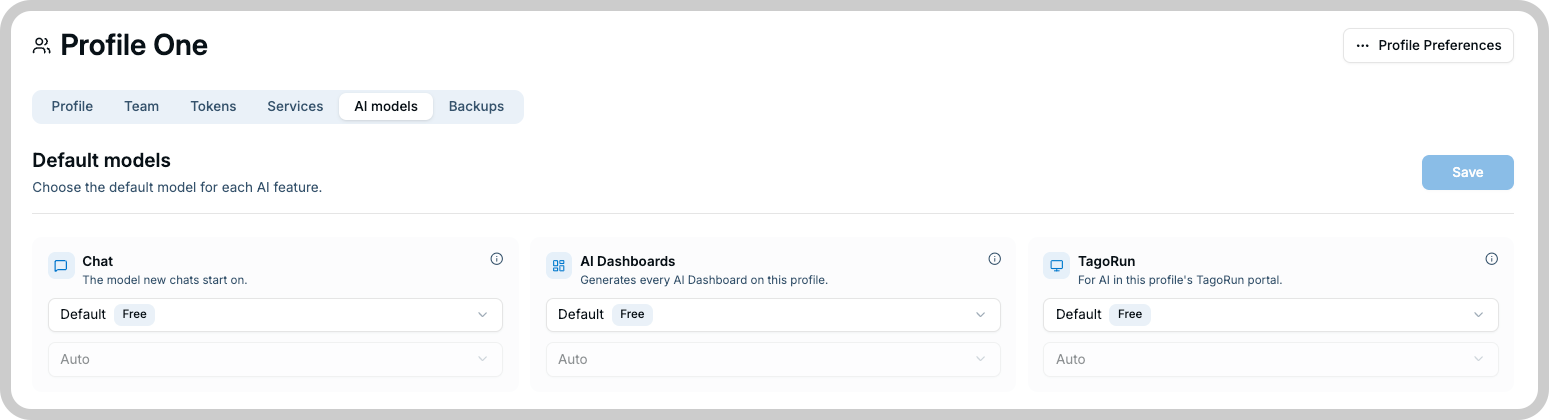
A new chat starts with the chat default, but the chat user can choose another model when the profile's chat menu allows it. AI Dashboard and TagoRUN requests always run on their configured defaults; they cannot be overridden per request.
Control the chat model menu
By default, chat users can select any model available to the profile. Turn on Curate the menu to limit the models and reasoning effort levels they can select.
For example, you can allow the free model and one catalog model while hiding more expensive models from chat users.
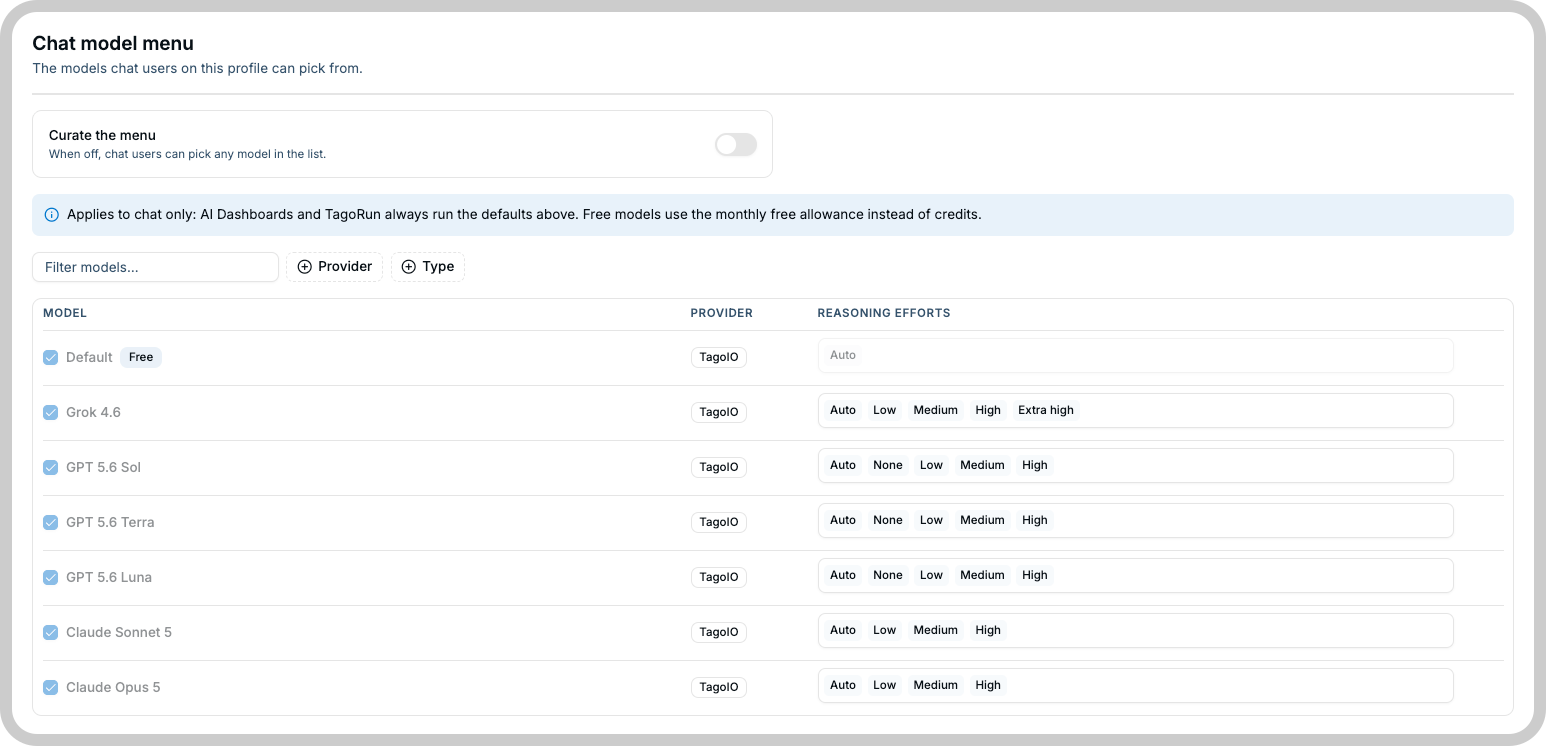
Menu curation affects chat only. It does not change the default models used by AI Dashboards or TagoRUN. On a profile with its own AI provider, the menu changes; see Model selection with your own provider.