AI models and pricing
The model catalog lists the AI models available to your account and the input and output rates for each model. On TagoIO Cloud, catalog models use AI Credits. On TagoDeploy, the catalog rates act as usage meters rather than TagoIO charges (see TagoDeploy billing).
How a request is billed
How a request is billed depends on the model path used by the profile:
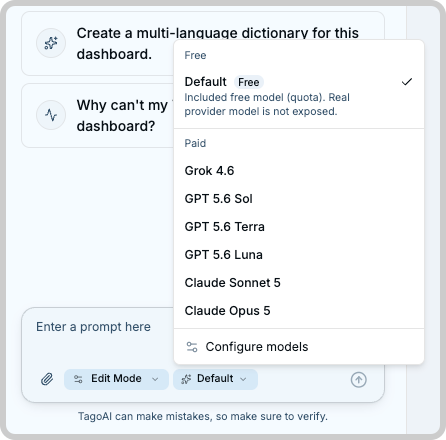
- Free: the default model. It is a small model suited to quick questions and light tasks. It spends no credits, and each profile gets a monthly allowance of free model requests based on its plan (TagoAI Service).
- AI Credits: any paid model in the catalog. The request debits AI Credits from the account balance at the catalog price.
- Your own provider (BYOK): a profile configured with its own AI provider. Requests to your provider's models go through your provider account and are billed by that provider, so they spend no credits and no free allowance. The free model stays available on these profiles too; it runs on the TagoIO side and counts against the monthly allowance as usual.
Every combination, in one table:
| Profile configuration | Model path | Who bills the usage | Uses AI Credits | Uses free allowance |
|---|---|---|---|---|
| TagoIO default | Free model | No additional charge | No | Yes |
| TagoIO default | TagoIO catalog model | TagoIO, at the catalog rate | Yes | No |
| Own provider | Provider model | Your provider | No | No |
| Own provider | Free model | No additional charge | No | Yes |
TagoDeploy billing
TagoDeploy does not use an AI Credits wallet. Models run through the instance's configured provider credentials, and that provider bills the actual usage.
The catalog still assigns a price to each model. TagoDeploy uses that price to report usage and enforce profile spend caps, but TagoIO does not charge the displayed amount. See TagoDeploy behavior.
The free model is intentionally small. For demanding work such as long analyses, dashboard generation, or large debugging sessions, we recommend a catalog model or your own provider.
Reading the catalog
Each model in the catalog shows:
- Name and description: what the model is and what it is good at.
- Input price and output price, per 1 million tokens, in your wallet currency.
- Reasoning effort levels the model supports.
Input tokens can include more than the text entered in the current prompt. Depending on the feature, the request can include previous conversation messages, resource information, and instructions TagoIO adds to complete the task. Output covers what the model writes back.
A model that costs 3.75 per 1M input tokens costs 0.00000375 per input token, so most single requests cost a fraction of a cent. Longer conversations generally use more input tokens, because previous messages are included as context for later requests.
Catalog prices
The catalog displays the final TagoIO rate for each model. No additional model service fee is added when the request is billed.
Model availability and prices can change. Check the catalog in the Admin before choosing a model or estimating future costs.
Regional availability
The models available in the catalog can differ between US and EU accounts. Check the catalog in the Admin for the models and prices available to your account.
Reasoning effort
Some models support multiple reasoning effort levels. A higher level allows the model to spend more computation on the request, which can help with complex tasks but can also increase response time and token usage.
The available levels depend on the model, and auto is always available. When you select auto, TagoIO chooses a level appropriate for the request. The free model supports auto only.
Choosing a model
Requests that do not name a model use the profile's configured default model, or the free model when the profile has none configured. Choose a catalog model when the task justifies it: long analysis scripts, large payload debugging, or dashboard generation where quality matters more than the credit cost.
Before using a TagoIO catalog model, make sure the account has enough AI Credits and that the profile is within its monthly spend cap. If either condition prevents the request, no model usage is charged.
Models connected through your own provider do not use AI Credits. Your provider's billing and limits apply instead.
The catalog changes over time as models are added, repriced, or retired. Check the current prices in the Admin rather than relying on a rate you noted earlier.