AI Credits
AI Credits are prepaid funds on your account that pay for AI models charged by usage. You load money onto the account first, and each request to a TagoIO catalog model debits the balance based on the model price and the size of the request.
Credits are separate from your TagoIO plan. Only paid models from the AI model catalog spend them. The free model never touches your balance (it runs on the TagoIO side within its monthly allowance, on every profile), and a profile running its own AI provider is billed by that provider instead.
Free chat is not unlimited: the free model has a monthly request quota per profile. See TagoAI Service for the plan numbers, and the AI model catalog for the free model.
The financial terms at a glance:
| Term | Value |
|---|---|
| Purchase range | 10.00 to 1000.00 per purchase |
| Service fee | Added to the card charge, not credited to the balance; the Admin shows the current rate |
| Expiration | One year after the purchase that created the credits |
| Currency | USD or EUR, fixed when the wallet is created |
| Spend cap | Optional, per profile, per calendar month (UTC) |
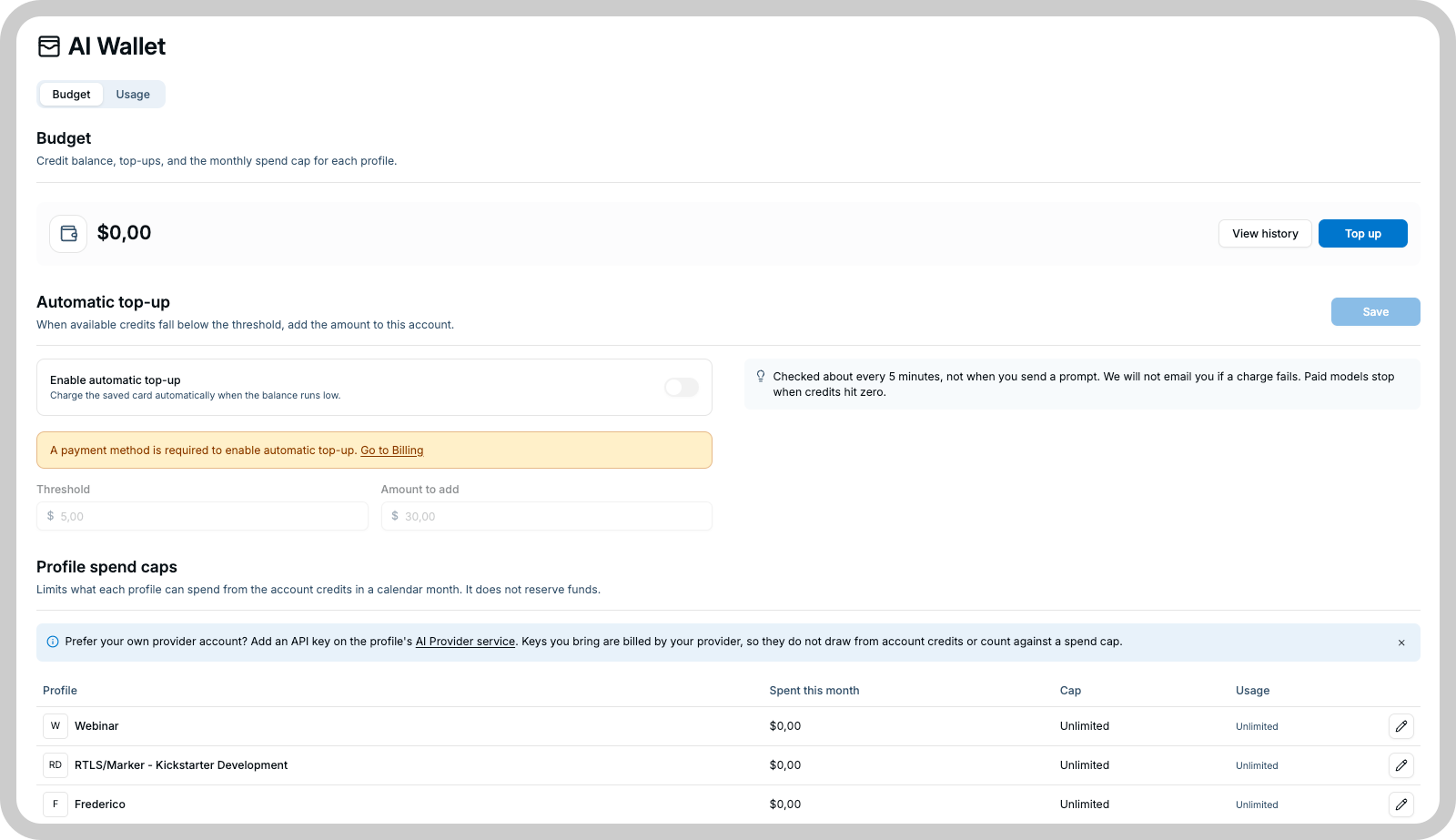
The wallet
Your credit balance belongs to the account, not to a profile. Every profile in the account draws from the same balance, and the only per-profile control is a monthly spend cap. There are no per-profile balances or allocations.
The wallet page shows:
- The current balance and its currency.
- How many purchases still hold unspent credits, and the date the next batch expires.
- The automatic top-up configuration.
- A history of every movement: purchases, spending, expirations, and adjustments issued by TagoIO support.
Currency
The wallet currency is set when the wallet is created, based on your account region: USD for US accounts and EUR for EU accounts. It cannot be changed afterwards, and TagoIO does no currency conversion. Prices, purchases, caps, and card charges all use that single currency.
Buy credits
Before buying credits, add a default card under Payment Methods. Purchases always charge the default payment method saved on your account.
To buy credits:
- Open the AI wallet.
- Select Top up.
- Enter an amount from 10.00 to 1000.00.
- Review the credit amount, service fee, and total card charge.
The service fee is added to the card charge and is not added to your AI Credits balance. For example, buying 30.00 in credits adds 30.00 to the wallet and charges the card 30.00 plus the displayed fee. Review the total card charge before confirming the purchase.
- Confirm the purchase.
After the payment succeeds, the purchased amount appears in the wallet balance. The service fee appears in the payment breakdown but is not added to the credit balance.
If the purchase result does not appear
If the page closes, times out, or does not show a result:
- Return to the AI wallet and check the balance and transaction history.
- If the purchase appears, do not start another purchase.
- If the Admin presents a retry option for the pending purchase, use that option instead of starting a new purchase. Retrying the same purchase cannot charge your card twice.
Starting a new purchase creates a separate payment. Only use the retry action associated with the original purchase.
Credit expiration
Credits expire one year after the purchase that created them. Spending always consumes the credits closest to their expiration date first, so the oldest credits leave the wallet before newer credits.
The wallet page shows the next expiration date. Expired credits are removed from the balance and appear in the history as an expiration entry. Expired credits are not refundable.
Automatic top-up
Automatic top-up buys credits for you when the balance runs low. You set:
- Threshold: the balance below which a top-up is triggered.
- Amount: how much to buy, within the same range as a manual purchase (see Buy credits). The purchase service fee applies the same way.
For example, if the threshold is 20.00 and the top-up amount is 50.00, TagoIO schedules a 50.00 purchase after the balance falls below 20.00.
A scheduled job checks wallets every few minutes, so a top-up happens shortly after the balance dips below the threshold, not at the instant of the request that crossed it. A request that arrives before the top-up lands can still fail for insufficient credits.
When a top-up fails
Automatic top-up uses the saved default payment method. When the charge fails, for example because the card was declined or removed:
- The balance stays where it is, and requests to catalog models keep failing for insufficient credits.
- Automatic top-up stays enabled, and TagoIO tries again on later checks while the balance remains below the threshold.
- TagoIO does not email you when a charge fails.
- Successful top-ups appear in the wallet history; a failed charge does not create a history entry.
Keep a valid card on the account so top-ups can go through.
Set a monthly profile spend cap
A spend cap limits how much a single profile can spend in a calendar month. It does not reserve part of the account balance for that profile; a capped profile still competes for the same balance as every other profile.
To configure a cap:
- Open the AI wallet.
- Find the profile spend cap settings.
- Select a profile.
- Enter the monthly cap, or clear it to remove the cap.
- Save the setting.
The counter resets at the beginning of each calendar month in UTC. When a profile reaches its cap, its requests to catalog models are refused until the month rolls over or you raise the cap.
Where the cap applies
| Environment and model path | Does the profile spend cap apply? |
|---|---|
| TagoIO catalog model on TagoIO Cloud | Yes, on AI Credits spending |
| Free model | No; the monthly allowance applies |
| Own-provider model on TagoIO Cloud | No; your provider's limits apply |
| Instance-provider model on TagoDeploy | Yes, based on the catalog value |
Resolve wallet and spending errors
| Message | What to do |
|---|---|
| Insufficient AI credits | The account balance cannot cover the request. Top up the balance in the AI wallet, or enable automatic top-up. |
| This profile has reached its monthly AI spend cap | The profile hit its monthly cap. Raise it in the spend cap settings or wait for the next calendar month. |
| Top-up amount supports at most 2 decimal places | The purchase amount has more than two decimal places. Enter an amount with at most two. |
| Cannot top up AI credits without a payment method | No default card is saved on the account. Add one under Payment Methods. |
TagoDeploy behavior
TagoDeploy does not use an AI Credits wallet.
| Capability | TagoIO Cloud | TagoDeploy |
|---|---|---|
| AI Credits balance | Available | Not available |
| Credit purchases | Available | Not available |
| Automatic top-up | Available | Not available |
| Provider billing | TagoIO or your configured provider | The instance provider account |
| Usage statistics | Report charged spend | Report catalog value as a usage meter |
| Profile spend cap | Enforced on AI Credits spending | Enforced against the catalog value |
On TagoDeploy, paid-model usage runs on the instance's own provider credentials and is priced from the instance catalog for metering and cap enforcement. TagoIO bills nothing for it; the instance's provider account pays for the actual usage.