AI Dashboard
Experimental. This feature may change or be removed.
An AI Dashboard is a full-page dashboard built from a natural language prompt. You describe the charts and layout you want; TagoIO generates the view and loads data from your devices. Unlike Normal and Blueprint dashboards, you do not place widgets on a grid. You work in the Admin prompt bar.
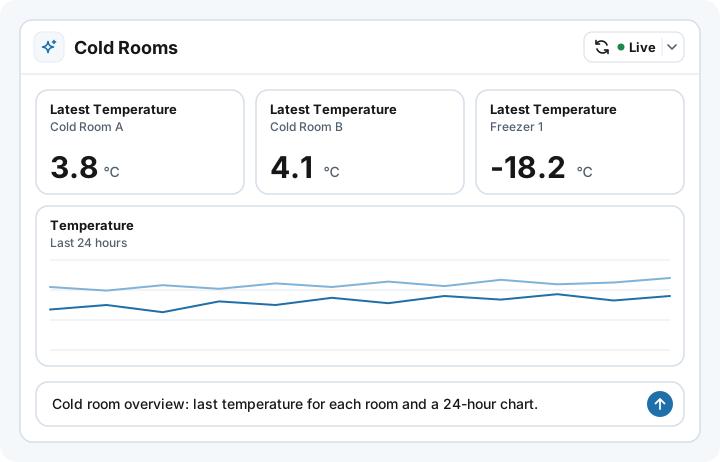
Where to use it
| Context | Support |
|---|---|
| Admin | Yes: create, generate, refine, and view. |
| TagoAI | Required for generate / refine. If AI is off for the profile, the AI create tab is gated and new layouts cannot be produced. |
| TagoRUN | Yes: signed-in Run users view it read-only, or build their own version with Per Run User Generation. Each user sees data only from the devices they can access. See TagoRUN. |
| Share public | Not supported. |
| Distribute | Not supported. |
AI Dashboard is experimental. For share links, templates, or a classic widget grid, use Normal or Blueprint instead.
Why use it
- Prompt instead of placing widgets. Describe the dashboard in plain language; the model produces the layout. On Normal and Blueprint you build the same kind of view by adding widgets to a grid.
- Refine by chat. Iterate on layout, colors, charts, and copy without dragging widgets or rebuilding the page. See Generating and Refining.
- Data updates without regenerating. Live refresh reloads widgets when their devices receive data, and the refresh button and interval refresh reload the numbers on demand or on a timer, all without touching the layout. Generate again only when you want a new design. See Data and Refresh.
- No widget grid. Presentation is one generated full-page layout, not tiles you arrange yourself.
How it works
- Create an AI Dashboard from the create dialog (AI tab). Optionally copy an Example prompt for later.
- Use the prompt bar to generate or refine the layout. Conversation history stays in the browser session only.
- After generation finishes, Admin loads data so charts and tables fill in.
- Numbers update on their own with Live refresh when the dashboard reads device data; refresh on demand or on an interval otherwise. Generate again only when you want a different layout.
To build or refine a layout from code, for example from an Analysis, use Generate AI Dashboard in the API.
Compared to other dashboard types
| Type | How you build it | Presentation |
|---|---|---|
| Normal | Drag-and-drop widgets on a grid | Widget grid |
| Blueprint | Same grid, slots resolve devices at runtime | Widget grid |
| AI Dashboard | Natural language generate / refine | Full-page generated |
| Custom Dashboard | Upload HTML; use saved queries or Analysis Endpoints | Full-page uploaded |
Normal and Blueprint are the standard path when you need share, distribute, or fine-grained widget control. AI Dashboard is for generating a full-page layout from a prompt. Custom Dashboard is for a full-page layout you author and upload yourself. Both full-page types open in Admin and in TagoRUN.
Prerequisites
- TagoAI (or profile AI settings) must be available so generation can run. See Access and Limits.
- Device data you want the dashboard to chart, using names the model can match in your profile.