Formula
The Formula feature enables users to modify the visualization of data in specific widgets. Located inside the configuration tab of most widgets, a Formula can be applied to all fields of a stored register, including variable, value, unit, group, location, and metadata.
How it works
The system receives input data from a variable in your Device, applies a formula to generate a temporary output value, and displays that output in the widget. This output is only for visualization and is not saved as a variable in device data storage.
Example flow:
- Input value: 10
- Formula: $value$ * 2 + 5
- Output shown in widget: 25
Example formula (text):
$value$ * 2 + 5
Formula configuration in widgets
The Formula configuration is available inside most widget configuration panels. It produces a temporary, visual-only value and does not alter the stored device data.
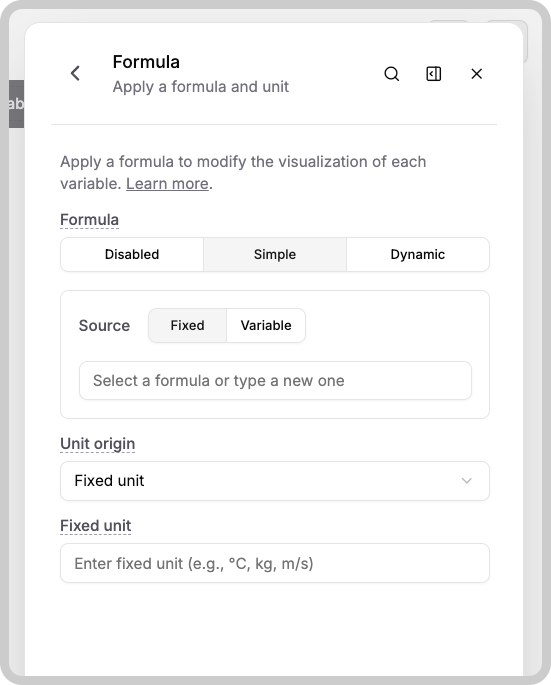
Typical elements in the Formula panel include:
- Formula mode: Disabled | Simple | Dynamic
- Source: Fixed | Variable
- The formula expression input (for example: ($VALUES$ - 273.15) * 9/5 + 32)
- Unit origin and related unit fields
- "Apply a formula to modify the visualization of each variable" help text and a "Learn more" link
Example formula (temperature conversion):
($VALUES$ - 273.15) * 9/5 + 32
Notes
- The output generated by a Formula is temporary and only used by the widget for display purposes.
- The original variable and device data remain unchanged by a Formula.
- Formula expressions can reference stored fields like value, unit, group, location, and metadata.
Source options
When configuring a formula you can choose between two source types:
- Fixed: enter the formula directly into the field.
Example:
$value$ * 2 + 5 - Variable: store the formula in a variable's
valuefield (and optionally a unit). Example JSON for a temperature conversion variable:{"variable": "equation_f_c","unit": "°C","value": "($value$-32)*5/9"}
Operators
The following operators are available in Formula expressions:
| Operator | Name | Example |
|---|---|---|
| +, - | add, subtract | $value$ + 1000 |
| /, * | divide, multiply | $value$ / 2.14 |
| to | unit conversion | $value$ inch to cm |
| ? : | conditional expression | $value$==1 ? $VALUE$ ON : OFF |
| >>, << | arithmetic shifts | $VALUE$ >> 1 |
| sqrt, sin, log | math operations | sqrt ($value$) |
More operators can be found on Math.js.
Date & Time Operations
The Date() function formats date and time values dynamically.
Syntax
Date(source, format_string)
- source: the value containing the date/time (variable, metadata field, or system value).
- format_string: desired output format using supported tokens or preference variables (
DATE_FORMAT,TIME_FORMAT).
Special variables are replaced at runtime based on the current TagoRUN user's settings.
| Formula Example | Description | Example Output |
|---|---|---|
Date($METADATA.shipped_at$, "$DATE_FORMAT$ $TIME_FORMAT$") | Formats a metadata date using user preferences | 07/23/2024 14:30 |
Date($VALUE$, "$DATE_FORMAT$ HH:mm:ss") | Custom time with user date format | 23/07/2024 18:45:10 |
Date($VALUE$, "YYYY-MM-DDTHH:mm:ss[Z]") | ISO 8601 format for timestamps | 2024-07-23T18:45:10Z |
Date($TIME$, "HH:mm") | Time only, 24‑hour format | 14:30 |
Formula application examples
To visualize a temperature in Fahrenheit when the device stores Celsius:
$VALUE$ celsius to fahrenheit
or
($VALUE$ × 9/5) + 32
More options are available in the dropdown list of the Formula field.
Units for output variables
After converting a value, you can set the unit that appears next to it. Use the Unit Origin field to define where the displayed unit comes from. Learn more about Display Units.
Minimum and Maximum limits
The formula does not adjust the widget's data range. The Min and Max values are still controlled by the settings in the Data Range tab.
Dynamic Formulas
Dynamic Formulas allow formulas to adapt based on user preferences or browser settings. To use them:
- Create a new visualization preference in TagoRUN via Custom Settings.
- In the widget's configuration, enable Dynamic Formula and select:
- Source: user preference or browser preference.
- Option: the specific custom setting created earlier.
- Condition: optional value to check before applying the formula.
- Formula Type: Fixed or Variable.
- Formula: the expression to apply.
Dynamic Formulas are especially useful for letting users choose units (Celsius, Fahrenheit, Kelvin) or other display options that automatically adjust across dashboards.