MQTT Retain on TagoIO Broker
Legacy MQTT is deprecated and will reach end of life on August 2, 2027. On
that date the TagoIO MQTT Broker (mqtt.tago.io) will be shut down and devices
will no longer be able to connect. The broker was available exclusively for
Starter and Scale accounts in the US database region that upgraded before
April 15, 2026; accounts created or upgraded after that date do not have access
to this feature.
Please migrate before the end-of-life date to one of the following options:
- TagoTiP MQTT: supports all account types and regions (US and EU).
- TagoDeploy MQTT: a single-tenant TagoIO instance with full support for the MQTT protocol.
Existing devices and actions will continue to function until August 2, 2027, but no new features or bug fixes will be provided.
TagoIO's MQTT broker does not natively support the standard MQTT retain feature. However, you can implement an equivalent workaround by using TagoIO Analysis and Actions to store the last message published to a topic and resend it when a new client subscribes.
This approach involves using the Analysis and Actions features to store the last message published to a topic and then resend it when a new client subscribes.
Setting Up Message on Subscribing
To build an MQTT retain workaround with TagoIO, you can either publish directly to a topic with an Action or use an Analysis script for more complex scenarios.
Using Actions to Publish a Message to a Subscriber
-
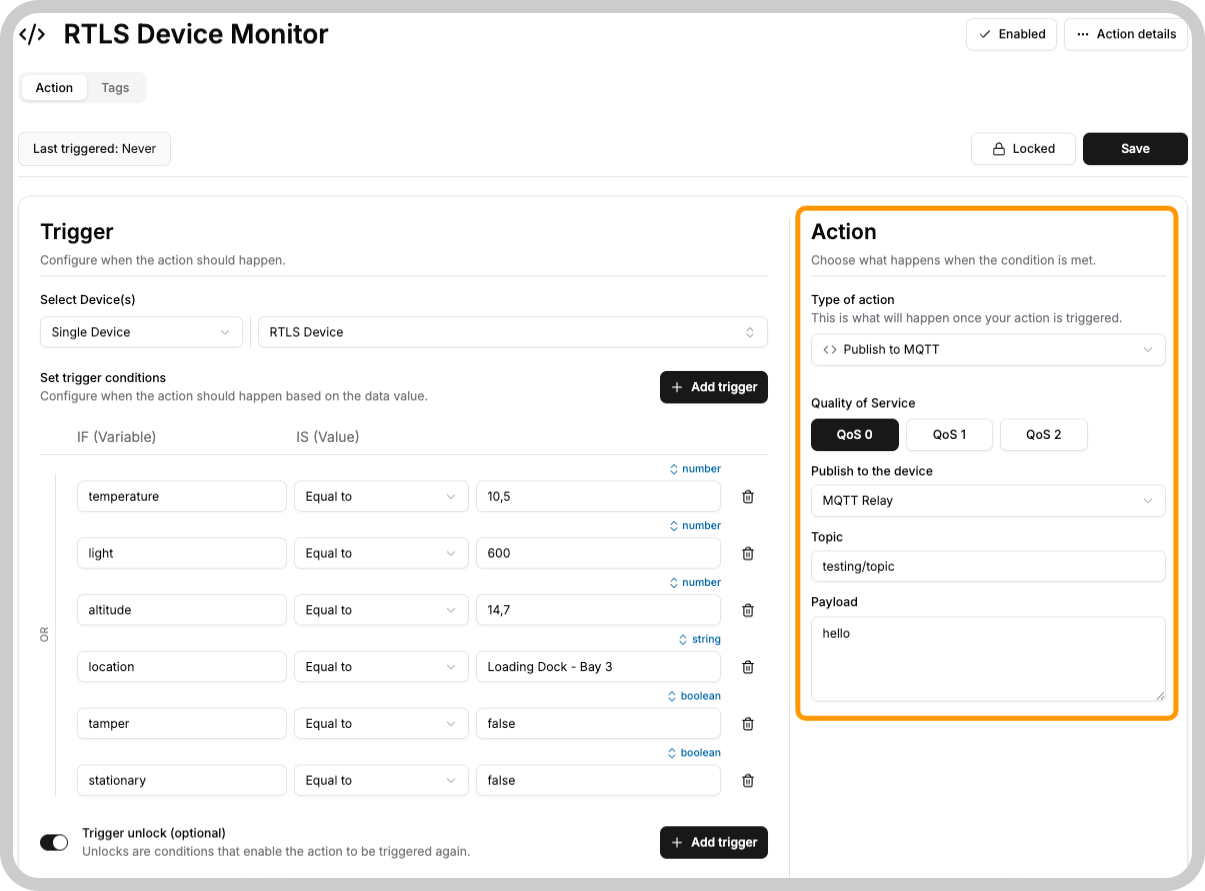
Create an Action
- Navigate to the Actions section in your TagoIO dashboard and create a new action.
- Choose the event that will trigger this action. It could be a variable update, a scheduled time, or another custom trigger.
-
Configure MQTT Publish
- In the action configuration, select "MQTT Publish" as the action type.
- Specify the topic you wish to publish to and the message payload.
Using Analysis for Advanced Scenarios
For scenarios where you need to publish for a large number of devices/topics and also require more control over the publishing process, you can use an Analysis script.
1. Create an Analysis
- Go to the Analysis section and create a new analysis.
- Choose Node.js as the environment.
2. Implement MQTT Publish Script
const { Analysis, Services } = require("@tago-io/sdk");

async function mqttPushExample(context, scope) {
  // Create your data object to push to MQTT
  const myDataObject = {
    variable: "temperature_celsius",
    value: (myData.value - 32) * (5 / 9),
    unit: "C",
  };

  // Options for the publish
  const options = { qos: 0 };

  // Publishing to MQTT
  const MQTT = new Services({ token: context.token }).MQTT;
  await MQTT.publish({
    device: myData.device, // for immutable/mutable devices
    message: JSON.stringify(myDataObject),
    topic: "tago/my_topic",
    options,
  });
}

module.exports = new Analysis(mqttPushExample);
3. Trigger Analysis
- Configure an Action or another event to trigger the execution of your Analysis (e.g., a device update, a scheduled time, or any other event in your TagoIO application).
Refer to the Analysis documentation for details on creating scripts and integrating them with Actions and MQTT.