Running Analysis via Action
Actions can initiate scripts that run in the Analysis. This lets you define exactly when your code will execute.
- For example, you can run an Analysis every time data is sent from a device or when data meets a certain condition. Learn more in Trigger by Variable.
- You can trigger the Action when a resource change happens, for example, when a new Device is created or when a new RunUser is registered. Learn more in Trigger by Resource.
- You can also create a Schedule Action to trigger the Analysis at fixed time intervals.
Setting up the Action
To run an Analysis from an Action:
- Create the Action.
- Set the field "Type of action" to "Run Analysis".
- Select one or more Analyses to run.
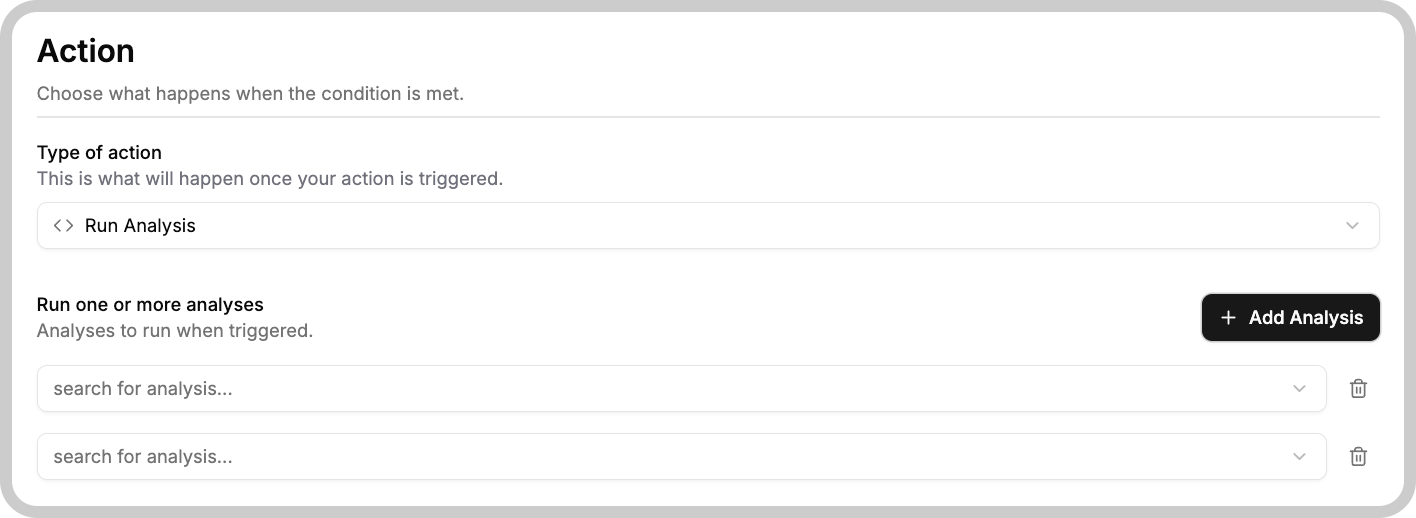
Notes about the UI shown above:
- The "Type of action" field should be set to "Run Analysis".
- Use the "Run one or more analyses" area to add the Analyses you want to execute (e.g., Analysis 1, Analysis 2).
- Use the plus and trash can icons to add or remove Analyses from the Action's list.
- You can specify up to 10 Analyses that will run in parallel when the Action is triggered.
Action Context Variables
When an Action triggers an Analysis, it automatically adds context variables that provide information about how the Analysis was initiated. These variables can be essential for the Analysis to execute correctly and respond appropriately to the specific trigger.
| Field Name | Description |
|---|---|
_action_id | The unique identifier for the Action. |
_action_type | The category or type of Action that triggered the Analysis. |
_action_state | Indicates whether the Action was locked or unlocked at the time this Analysis was run. |
_device_id | The identifier of the device that triggered the Action, if triggered by a device. |
Something missing from this page?