Trigger by Schedule
The trigger type Trigger by Schedule lets you define a time interval to execute your Actions automatically.
There are two categories within this trigger type:
-
By Interval Allows you to specify a time interval to trigger the Action automatically. Choose the time interval on the right side of the interface; the minimum allowed time is 1 minute.
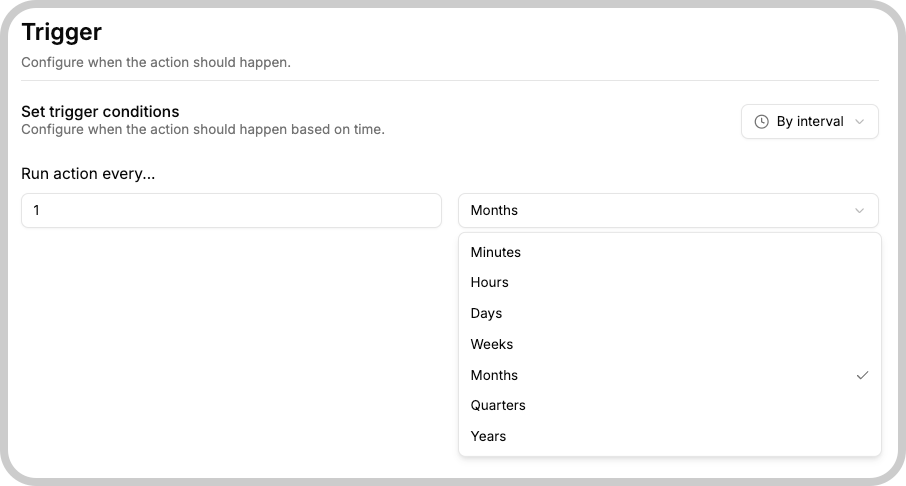
-
By Date Allows you to specify a date or a recurring date rule to trigger the Action. For example, you can choose to run an Action on the second Wednesday of each month.
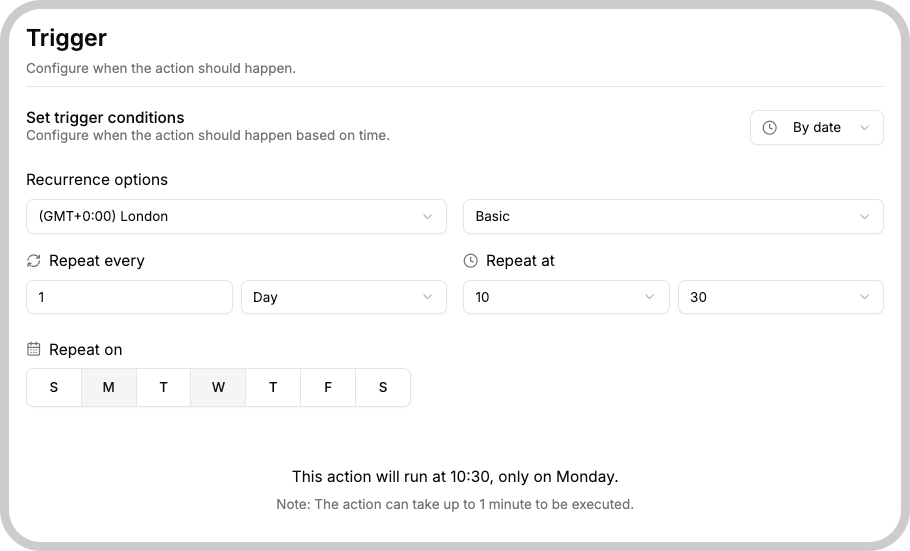
Customizing By Date
If you pick the By Date type, you can customize it in either a basic or an advanced way:
- Basic customization: Use the interface fields to define the date or recurring date rules.
- Advanced customization: Write a cron expression to define the date/time more precisely.
To learn more about advanced (cron) customization, see this article.
1. Basic customization details
The basic mode provides several interface fields that let you fine‑tune when your Action runs:
- Repeat Every: Choose the interval between executions. Options include:
- Day
- Week
- Month
- Repeat at: Specify the exact time of day the Action should trigger.
- Repeat on: Select one or more weekdays for the Action to run.
- Timezone: Set the timezone for the scheduled Action; by default it uses the account's timezone.
- Customization: Toggle between Basic and Advanced modes. The basic mode is enabled by default, but you can switch to advanced if needed.
- Explanation: A helpful field that displays a human-readable summary of when the Action will execute.
2. Advanced customization details
When you need more granular control, switch to the advanced mode and enter a cron expression. You can specify exact dates, times, and recurrence patterns beyond what the basic interface offers. For guidance on writing cron expressions, refer to this article.