Available Tables
TagoSQL exposes your data through virtual table functions. Every table in a FROM clause must use one of
them (plain table names are rejected) and must have an alias. Pick by what you want back:
| You want | Use | Example |
|---|---|---|
| The sensor readings stored on one device | device('id') | FROM device('62a1...') AS d |
| The rows stored in one entity | entity('id') | FROM entity('62a1...') AS e |
| The latest reading per device, many devices | device_data_by_tag('key','value') | FROM device_data_by_tag('type','sensor') AS f |
| Your device inventory (names, tags, status) | devices() | FROM devices() AS d |
| Your entity inventory | entities() | FROM entities() AS e |
The two groups answer different questions. In a data table (device, entity, device_data_by_tag) one row
is one stored data point. In a list table (devices, entities) one row is one device or one entity.
device and entity also have a tag form (device_tag('key','value'), entity_tag('key','value')) that
picks the first resource matching that tag instead of naming an id: when several resources match, the
first one ordered by resource id wins, so the same tag always resolves to the same resource, which is not
necessarily the one you had in mind. Use the id form when you need a specific one, and device_data_by_tag
when you want all matching devices.
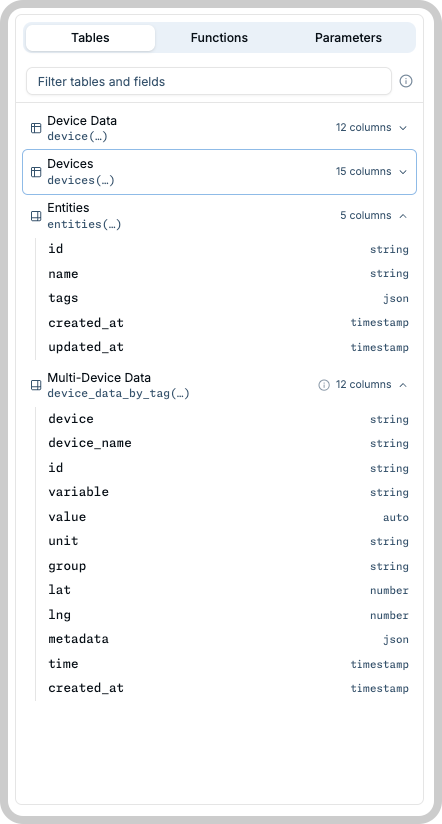
Data from one device
device('id') and device_tag('key','value') read the time-series data stored on a device.
| Column | Type |
|---|---|
id | string |
variable | string |
value | auto (number / string / boolean) |
unit | string |
group | string |
lat | number |
lng | number |
metadata | json |
time | timestamp |
created_at | timestamp |
The value column stores numbers, strings, and booleans. In a WHERE clause its type follows what you
compare it against: value > 30 treats it as a number, value = 'open' as a string, value = true as a
boolean. In the output, value comes back as the type it was stored with.
The tag form reads the data of the first device carrying the tag, ordered by device id, so a tag matching
several devices always resolves to the same one but not necessarily the one you had in mind. Use device('id')
when the device matters, and device_data_by_tag when you want every matching device.
SELECT d.variable, d.value, d.time
FROM device_tag('device_type', 'gateway') AS d
WHERE d.variable = 'uptime'
ORDER BY d.time DESC
LIMIT 20
Data from one entity
entity('id') and entity_tag('key','value') read the rows stored in one of your
Entities. Columns are dynamic: each entity exposes exactly the fields defined in
its own schema, with their native types. SELECT * returns that entity's columns, and you can only
reference columns the entity actually has. entity_tag follows the same pick-first rule as device_tag: it
reads the first entity carrying the tag, ordered by entity id, so name the id when the entity matters.
SELECT e.*
FROM entity_tag('category', 'inventory') AS e
ORDER BY e.created_at DESC
LIMIT 10
Data from many devices
device_data_by_tag('key','value', ...) is the fleet function: one query returns the latest reading per
device across every active device carrying ALL the tags you list (1 to 5 pairs, AND-combined). Built for
dashboards that show a whole fleet at once, like a map with each device's last location or a table with each
device's last temperature.
SELECT device, device_name, value, time
FROM device_data_by_tag('org_id', 'XY', 'type', 'sensor') AS f
WHERE variable = 'temperature' AND time > $1
ORDER BY device
It exposes the same columns as data from one device, plus two extras: device (the
device id) and device_name.
A few rules keep it fast even against hundreds of devices; breaking one is a clear 400:
- Filter on one variable (
variable = '...') and give a recent time bound (time > <timestamp>), both as plainANDconditions. How far back the bound may reach depends on your plan (see Resource Limits). - The tag filter may match at most your plan's device cap per request. For larger fleets, page with the
after_devicebody field (see Executing Queries). - No aggregates or grouping, and no JOINs with other tables. Devices that never stored data are skipped.
Your device inventory
devices() and devices_tag('key','value') list your devices themselves (not their data). Useful for
reports over the fleet: how many devices are active, which ones stopped sending data, which carry a tag.
| Column | Type |
|---|---|
id | string |
name | string |
description | string |
active | boolean |
visible | boolean |
type | string |
tags | json |
network | string |
connector | string |
last_input | timestamp |
created_at | timestamp |
updated_at | timestamp |
chunk_retention | string |
chunk_period | string |
params | json |
devices_tag('key','value') returns all devices carrying the tag, not just the first one, and it carries
the same columns as devices() including params.
SELECT d.id, d.name, d.last_input
FROM devices_tag('device_type', 'sensor') AS d
WHERE d.active = true
ORDER BY d.name
LIMIT 100
The params column
params carries the device's
Configuration Parameters as a json array, one
element per parameter, in the same shape List device params returns:
{"id", "key", "value", "sent"}, ordered by key. A device with no parameters gets an empty array ([]).
SELECT id, name, params FROM devices() AS d WHERE d.active = true LIMIT 100
{
  "id": "62a1b3c4d5e6f7a8b9c0d1e2",
  "name": "Warehouse sensor",
  "params": [
    { "id": "64f2a1b3c4d5e6f7a8b9c0d1", "key": "firmware_version", "value": "1.2.0", "sent": false },
    { "id": "64f2a1b3c4d5e6f7a8b9c0d2", "key": "sampling_interval", "value": "300", "sent": true }
  ]
}
- Element
idis the parameter row id, so you can pass it straight to Create and edit device params or Delete device param. - A device with two parameters under the same key returns them as two separate elements, matching the REST API.
- The column is part of the devices column set, so
SELECT *includes it, andGET /sql/tablesreports it typedjson.
Using params in WHERE, GROUP BY, ORDER BY, or inside an aggregate fails with a 400. Filter by the
other device columns (name, tags, active, and the rest) and read the parameters from the result.
Your entity inventory
entities() and entities_tag('key','value') list your entities.
| Column | Type |
|---|---|
id | string |
name | string |
tags | json |
created_at | timestamp |
updated_at | timestamp |
entities_tag('key','value') returns every entity carrying the tag.
SELECT e.id, e.name, e.updated_at
FROM entities_tag('category', 'inventory') AS e
ORDER BY e.name
LIMIT 50
Inventory tables are single-table-only: they cannot be joined with any other table.
What SQL is supported
The allowed statement shape, operators, aggregates, and JOIN rules are on the Queries page.
Discovering your schema
You do not need to memorize any of this. The schema discovery endpoint (GET /sql/tables, see the
TagoIO API reference) returns the full catalog above plus the list of your own
devices and entities, and can resolve the columns of a specific entity. Query editors use it in the browsing
panels and in editor autocomplete, which behave differently:
- The Tables and Functions panels. Clicking a table family, a column, or a function copies its identifier (or snippet) to your clipboard, so you can paste it where you want it. The panels never touch the query you are writing.
- Editor autocomplete. Autocomplete is the path that writes into the editor. A completion in a
FROMorJOINclause inserts the table function together with its alias, which the parser requires.
A profile token can always read the catalog. An analysis can read it too, when a policy grants it any action on the SQL Query resource.
The functions catalog
Alongside tables and resources, the response carries a functions array: everything callable inside a
query that is not a table function. It is built from the allowlist and is identical for every caller.
"functions": [
  { "name": "count", "kind": "aggregate", "args": ["column"], "description": "Row count" },
  { "name": "avg", "kind": "aggregate", "args": ["column"], "description": "Average of a numeric column" },
  { "name": "sum", "kind": "aggregate", "args": ["column"], "description": "Sum of a numeric column" },
  { "name": "min", "kind": "aggregate", "args": ["column"], "description": "Smallest value of a column" },
  { "name": "max", "kind": "aggregate", "args": ["column"], "description": "Largest value of a column" },
  { "name": "session_user_id", "kind": "session", "args": [],
    "description": "Id of the user executing the query, filled by the server",
    "example": "COALESCE(session_user_id(), '...')" },
  { "name": "session_user_tag", "kind": "session", "args": ["key"],
    "description": "The executing user's value for a tag key, filled by the server",
    "example": "COALESCE(session_user_tag('key'), '...')" }
]
kindisaggregateorsession. The session functions scope a query to the session running it.exampleis present only on the session entries: it shows the COALESCE authoring fallback.COALESCEis not a standalone function here, because it is accepted only wrapping a session function.- Table functions are not repeated in this array; they are the
tablescatalog above.