TagoDeploy Monitoring
TagoDeploy Monitoring alerts you when infrastructure metrics or monthly spending cross thresholds you set. Use email or SMS to notify your team, or call a webhook to trigger an automated response.
You can already view infrastructure metrics on your project pages. Set up Monitoring to get notified when, for example, your database is running low on memory, an app's CPU usage is high, or spending approaches your budget.
Monitoring watches infrastructure and monthly spending, not TagoIO service usage limits, dashboards, devices, or device data. For alerts on profile services, use TagoIO Actions.
Why it's important
A dashboard that takes a little longer to load tells you something is slow. It does not tell you that the database is low on memory, that an installed app has hit its instance ceiling, or that this month's spend is about to pass your budget. Those are the failures that reach your users, and they build quietly before they show.
Monitoring rules notify you when a resource metric reaches a threshold you set, so you can investigate without continuously watching dashboards. Use them to track database load, installed-app utilization, and spending.
What you can monitor
Each alert rule reads one metric from one resource. You can create a rule for any metric in the table below.
| Service | Resource | Metrics |
|---|---|---|
| TagoIO Platform | Main Database | CPU utilization, Freeable memory, Connections, Read IOPS, Write IOPS, Network throughput |
| TagoIO Platform | API Cluster | CPU utilization, Memory utilization |
| TagoIO Platform | In-Memory Database | CPU utilization, Freeable memory, Cache hits, Network inbound, Network outbound |
| Each installed app (MQTT broker, middleware, custom Docker, web service) | Compute | CPU utilization, Memory utilization |
| Account | Billing | Budget: spending so far this month as a percentage of a budget you set |
Read IOPS and Write IOPS measure disk read and write operations per second.
For example, use rules to:
- Watch Main Database CPU utilization or Freeable memory to identify resource pressure and decide whether to resize the database.
- Watch an installed app's Compute CPU utilization to investigate capacity, review its instance ceiling, and decide whether to increase its instances.
- Track spending against your budget so you can review costs before the monthly invoice.
These alerts can help you respond before users experience problems, but they do not guarantee advance warning. A budget alert's timing depends on spending and the threshold you set.
See the Metrics reference for each metric's unit, meaning, and starting threshold.
How it works
The app has four pages:
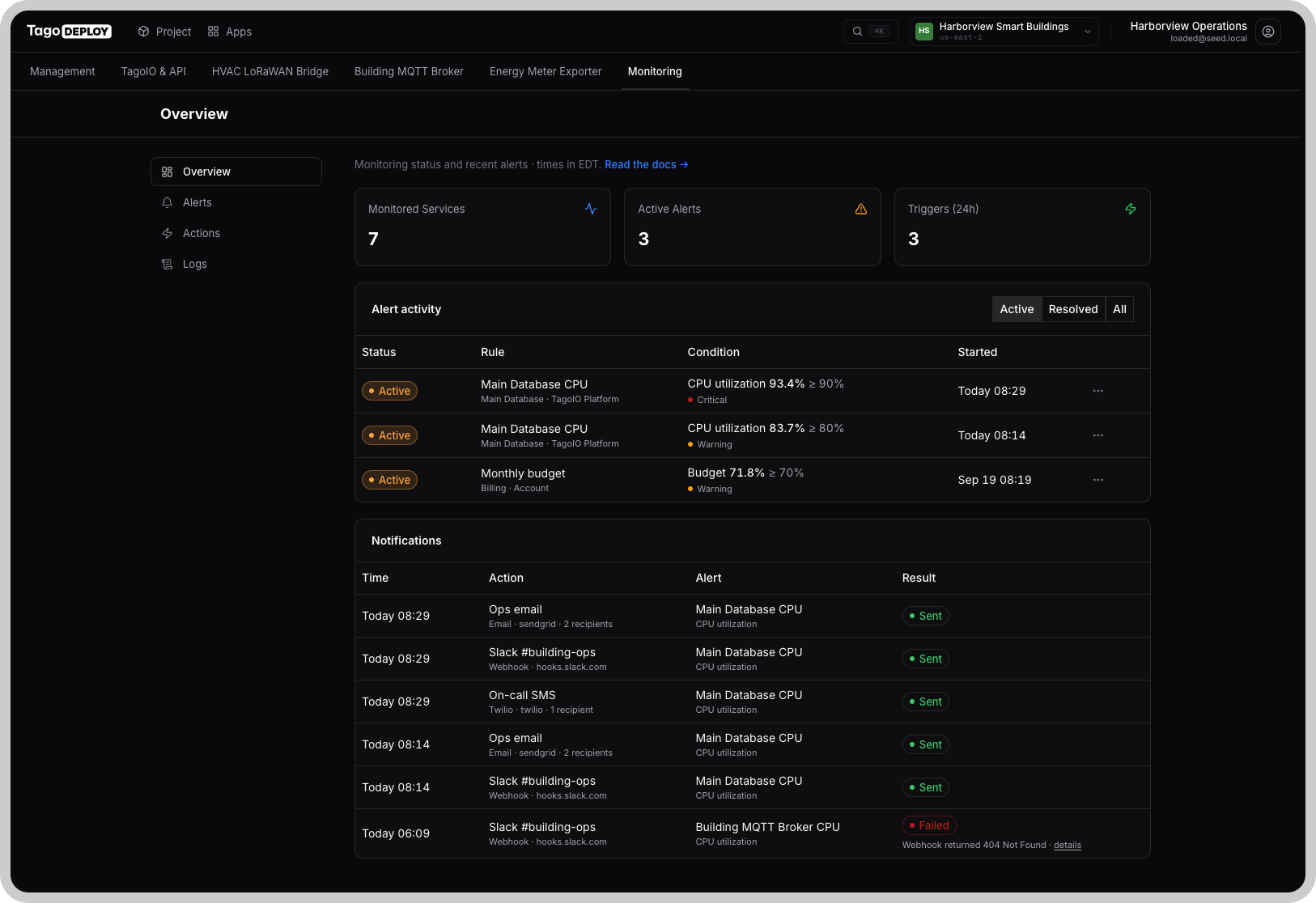
- Overview shows the Monitored Services, Active Alerts, and Triggers (24h) cards, with recent alert activity below them.
- Alerts lets you configure rules and their thresholds.
- Actions lets you configure email, SMS, and webhook responses. Define an action once and reuse it across rules.
- Logs records every check, threshold crossing, action run, and recovery.
Checks and notifications
The monitor checks each enabled rule every 5 minutes. It reads the metric's value for the last 5-minute window and compares it with each threshold. A rule can contain one or more thresholds.
When the value crosses a threshold, Monitoring:
- Runs that threshold's actions.
- Records the event in Logs.
- Marks the alert active.
The alert stays active until the value returns to the normal side of the threshold. Monitoring also records that recovery in Logs.
By default, the notification does not repeat while the alert stays active. If you need reminders, configure the threshold to repeat its actions at an interval you set.
Monitoring limitations
Monitoring runs inside your project's AWS region, next to the resources it watches. A regional outage can interrupt both your project and Monitoring, so you might not receive an alert.
Check Completed entries in Logs may also stop until the region recovers. Do not rely on Monitoring alone to detect regional outages.
For notice of regional incidents, check the AWS Health Dashboard for your project's region.
Where to go next
- Setting up Monitoring: install the app and create your first action and rule.
- Metrics reference: understand what each metric measures and choose starting thresholds.
- Responding to alerts: investigate a triggered rule and decide what to change.